> ## Documentation Index
> Fetch the complete documentation index at: https://docs.getcuemanager.com/llms.txt
> Use this file to discover all available pages before exploring further.
# Tournaments
> Run knockouts, round robins, and group stages with entry fees and prizes.
Tournaments let you run a club competition end to end: register players, collect entry fees, generate a draw, record match results, and pay out prizes. Everything lives under **Tournaments** in the sidebar and needs the Tournaments module permission.
## Creating a tournament
Go to **Tournaments** and select **New Tournament**.
Enter a **Name** (for example, "Crown Summer Cup"), then choose a **Format** and a **Game** (Snooker, 8-Ball, or 9-Ball).
Owners and SuperAdmins see a **Scope** field: **Single Branch** (pick the **Branch**, for example Gulberg Branch) or **All Branches**, which lets players from every branch enter one competition. Everyone else creates single-branch tournaments in their own branch.
**Start date**, **End date**, and **Registration deadline** are optional dates. **Max participants** caps the field; **Best of (frames)** sets the match length.
**Entry fee** is what each player pays to enter (for example, Rs 500). **Prize pool** is the total you plan to pay out. Both default to 0. Add a **Description** if you want, then select **Save**.
The tournament is created in **Draft** status.
### Formats
| Format | How the draw works | Best for |
| ------------------ | ---------------------------------------------------------------------------------------------------------------------------------------------- | ---------------------------------------- |
| Single Elimination | A knockout bracket. Rounds are labelled **Quarter-finals**, **Semi-finals**, and **Final**; the winner of the final gets a **Champion** badge. | One-day knockout events |
| Round Robin | Everyone plays everyone. Positions come from the **Standings** table rather than a bracket. | Small fields, league nights |
| Group Stage | Players are split into groups; you choose how many with the **Groups** field before generating. Each group has its own standings. | Larger fields that need group play first |
## Lifecycle
A tournament moves through statuses using the buttons on the tournament detail page. Only the valid next steps are shown.
| Status | What it means | Available actions |
| ------------------- | -------------------------------------------------------------- | ------------------------------------------------------- |
| Draft | Being set up. Not open to players yet. | **Open Registration**, **Cancel** |
| Registration Open | Players can be added. | **Close Registration**, **Cancel** |
| Registration Closed | Field is locked, ready to draw. | **Start Tournament**, **Open Registration**, **Cancel** |
| In Progress | Matches are being played. Participants can no longer be added. | **Mark Completed**, **Cancel** |
| Completed | Finished. The bracket and prizes are read-only. | — |
| Cancelled | Abandoned. | — |
**Cancel** is available at every stage before completion and is a one-way move — a cancelled tournament cannot be reopened. Deleting a tournament from the list is permanent and removes its participants, matches, and prizes with it.
## Participants
Open a tournament and use the **Participants** tab. Select **Add Participant**, then choose:
* **Member** — pick a registered member (for example, Ahmed Raza). Members already registered do not appear in the list, so you cannot add a duplicate.
* **Guest** — enter a **Guest name**, plus optional **Phone** and **Email** for a walk-in player.
**Seed (optional)** controls where a player lands in the draw. In an all-branches tournament, the **Branch** column shows which branch each player entered from.
Each row carries a participant status and row actions:
| Participant status | Meaning | Action that sets it |
| ------------------ | --------------------------------- | ------------------- |
| Registered | Entered, not yet arrived. | Default on adding |
| Checked In | Present and ready to play. | **Check in** |
| Eliminated | Knocked out by a recorded result. | Set automatically |
| Withdrawn | Pulled out. | **Withdraw** |
Use **Reinstate** to bring a withdrawn player back to Registered, and **Remove** to delete the entry entirely.
**Add Participant** is disabled once the tournament is In Progress, Completed, or Cancelled — close registration before you generate the draw.
## Entry fees
Rows with an unpaid entry fee show a **Collect entry fee** action. It opens a small dialog with the **Amount** (pre-filled from the tournament's entry fee, editable per player) and a **Payment method**: Cash, Card, JazzCash, Easypaisa, Raast, Bank Transfer, or Credit (Member Wallet).
Credit (Member Wallet) only works for a participant linked to a member. For a guest, the dialog shows "Credit payment requires a member participant." and the **Collect** button stays disabled — see [Wallets and credit](/members/wallets-and-credit).
Paid entries show a green tick next to the amount, so the **Entry Fee** column doubles as your collection checklist.
## Bracket and standings
The **Bracket & Standings** tab holds the draw. Select **Generate Bracket** to build matches from the current participants; for a group stage, set **Groups** first.
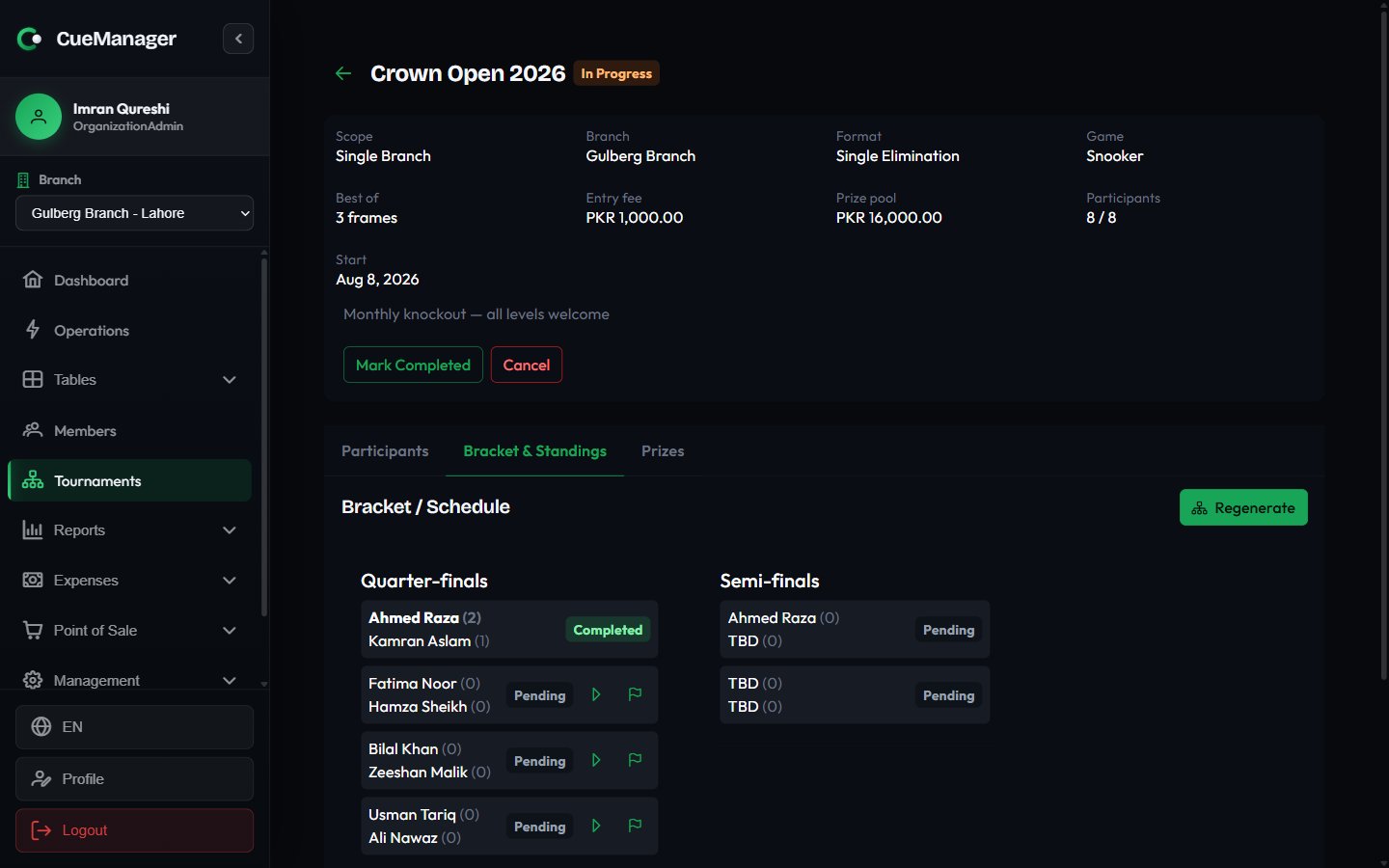 Each match card shows both players with their frame scores, a status tag, and actions:
* **Record result** — enter each player's frames won and save. If the scores are tied, you must pick the **Winner (scores are tied)** before saving.
* **Start session** — puts the match on a real table. Choose the **Table** (only tables in the tournament's branch appear, and pool tables are hidden for snooker matches) and a **Frame price (0 = free play)**. The match then plays out like any other session — see [Running a session](/sessions/running-a-session).
* **Sync result from session** — pulls the frame score back from that session so you do not type it twice.
* **Open table** — jumps to the [live floor](/tables/live-floor).
| Match status | Meaning |
| ------------ | ---------------------------------------- |
| Pending | Waiting on players from an earlier round |
| Scheduled | Both players known, not started |
| In Progress | Being played |
| Completed | Result recorded |
| Walkover | Awarded without play |
Below the draw, **Standings** ranks players by **P** (played), **W**, **L**, frames **For** and **Against**, and **Pts**. Round robin and group-stage tournaments rely on this table for placings.
**Regenerate** rebuilds the entire draw and discards the current matches, including recorded results. CueManager asks you to confirm first.
## Prizes and payouts
Use the **Prizes** tab to define what each finishing position wins.
Select **Add Prize**, then set **Position** (1, 2, 3...), an optional **Label** such as "Winner" or "Runner-up", and the **Amount**, for example Rs 20,000.
Once the results are in, use **Edit / assign winner** on the prize row and pick the participant from the **Winner** dropdown. Leave it as **Unassigned** until you know.
Select **Pay out**, choose the **Payment method**, and confirm. The row switches from **Unpaid** to a paid tag showing the method used.
**Pay out** stays disabled until a prize has a winner assigned. A paid prize can no longer be edited or deleted, so check the amount and winner before paying.
## Related pages
How payment methods and split payments work elsewhere in the app.
Register the players you want to add as members rather than guests.
Where tournament sessions and takings show up in your numbers.
Grant the Tournaments module to the staff who run events.
Each match card shows both players with their frame scores, a status tag, and actions:
* **Record result** — enter each player's frames won and save. If the scores are tied, you must pick the **Winner (scores are tied)** before saving.
* **Start session** — puts the match on a real table. Choose the **Table** (only tables in the tournament's branch appear, and pool tables are hidden for snooker matches) and a **Frame price (0 = free play)**. The match then plays out like any other session — see [Running a session](/sessions/running-a-session).
* **Sync result from session** — pulls the frame score back from that session so you do not type it twice.
* **Open table** — jumps to the [live floor](/tables/live-floor).
| Match status | Meaning |
| ------------ | ---------------------------------------- |
| Pending | Waiting on players from an earlier round |
| Scheduled | Both players known, not started |
| In Progress | Being played |
| Completed | Result recorded |
| Walkover | Awarded without play |
Below the draw, **Standings** ranks players by **P** (played), **W**, **L**, frames **For** and **Against**, and **Pts**. Round robin and group-stage tournaments rely on this table for placings.
**Regenerate** rebuilds the entire draw and discards the current matches, including recorded results. CueManager asks you to confirm first.
## Prizes and payouts
Use the **Prizes** tab to define what each finishing position wins.
Select **Add Prize**, then set **Position** (1, 2, 3...), an optional **Label** such as "Winner" or "Runner-up", and the **Amount**, for example Rs 20,000.
Once the results are in, use **Edit / assign winner** on the prize row and pick the participant from the **Winner** dropdown. Leave it as **Unassigned** until you know.
Select **Pay out**, choose the **Payment method**, and confirm. The row switches from **Unpaid** to a paid tag showing the method used.
**Pay out** stays disabled until a prize has a winner assigned. A paid prize can no longer be edited or deleted, so check the amount and winner before paying.
## Related pages
How payment methods and split payments work elsewhere in the app.
Register the players you want to add as members rather than guests.
Where tournament sessions and takings show up in your numbers.
Grant the Tournaments module to the staff who run events.