> ## Documentation Index
> Fetch the complete documentation index at: https://docs.getcuemanager.com/llms.txt
> Use this file to discover all available pages before exploring further.
# How billing works
> Frame, hourly, and per-minute pricing — and who pays for what.
Every rupee CueManager collects starts with a table session. This page explains the three pricing modes, the frame rules that decide who pays, where rates come from, and how a bill is finally settled.
## Pricing modes
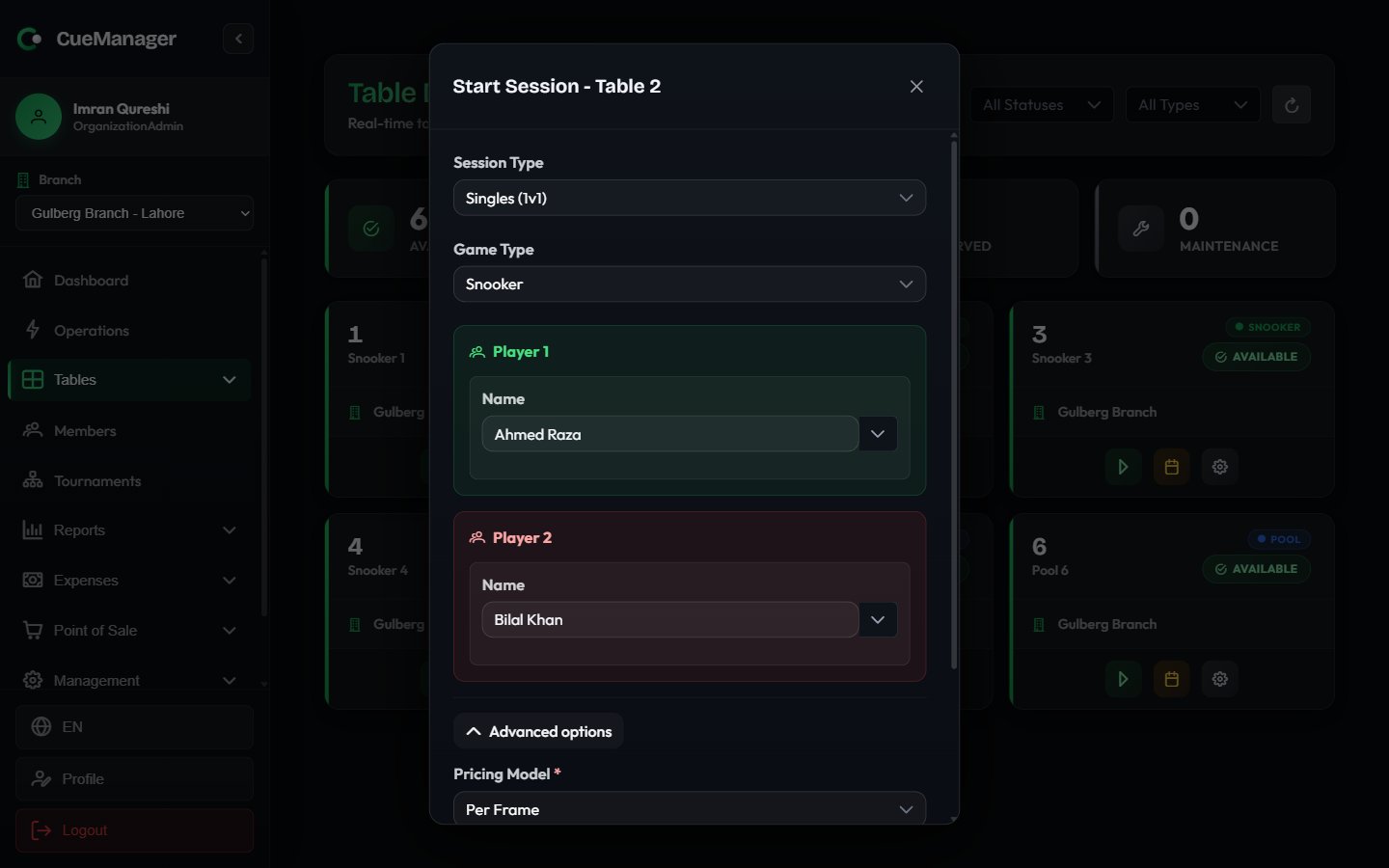
You pick the pricing mode when you start a session, under **Advanced options** in the **Start Session** dialog.
| Mode | Label in the app | What is charged | Who pays |
| ---------- | ---------------- | --------------------------------------- | ------------------------------- |
| Frame | **Per Frame** | One frame price per frame played | The loser of each frame |
| Hourly | **Per Hour** | Whole hours, rounded up, minimum 1 hour | Split evenly across all players |
| Per-minute | **Per Minute** | Whole minutes, rounded up | Split evenly across all players |
Time-based rounding is always upward. A session that ran 1 hour 5 minutes on **Per Hour** bills 2 hours; a session that ran 44 minutes 20 seconds on **Per Minute** bills 45 minutes.
## Billing types
**Billing Type** appears only for **Per Hour** and **Per Minute** sessions — frame sessions have nothing to pre-pay.
| Billing type | Label | Behaviour |
| ------------ | -------------- | ---------------------------------------------------------------------------------------------------------------------------------------------------------------------------------- |
| Open-ended | **Open-ended** | The clock runs until you end the session, and you bill the time actually played. |
| Pre-paid | **Pre-paid** | You enter **Pre-paid Minutes** up front. That becomes the floor on the bill — play less and the customer still pays for what they bought; play longer and the extra time is added. |
## Frame billing rules
Frame pricing is the model most snooker clubs run on, and it has two rules.
Every recorded frame is charged to the side that lost it. A player who wins every frame owes nothing.
A **Doubles (2v2)** session charges 2x the **Base Frame Price**, and the losing team's charge is split equally between its two players. Teams are Player 1 with Player 3 against Player 2 with Player 4.
Frames reach the bill in two ways: staff record the winner from the table card, or the snooker marker records it when the frame ends. Either way the result is confirmed before it is billed.
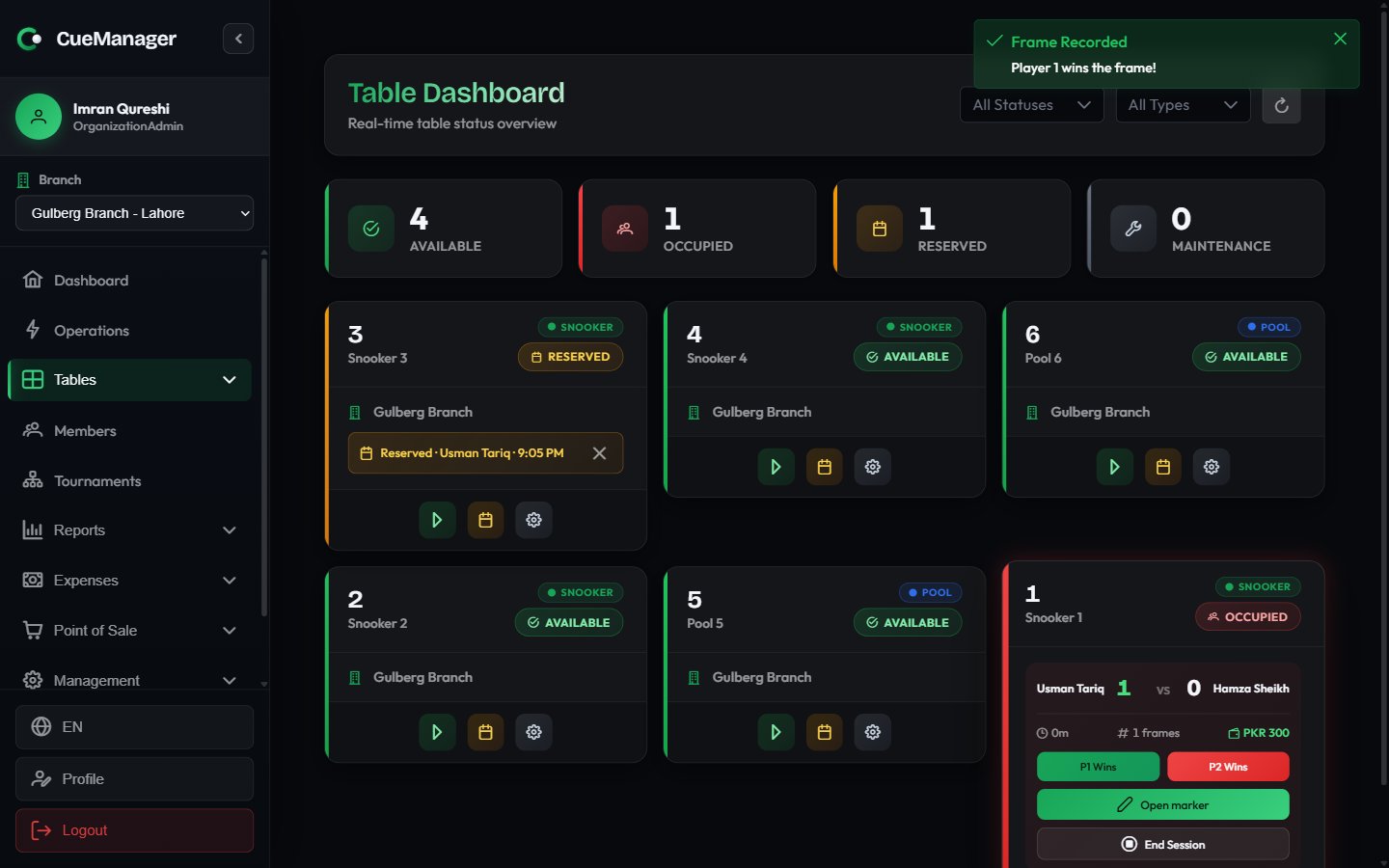 See [Running a session](/sessions/running-a-session) and [Snooker marker](/sessions/snooker-marker) for the mechanics.
## Where rates come from
Rates live on the branch, not on individual tables.
Each branch has **Pricing Rates** — **Rate Per Frame**, **Rate Per Hour**, and **Rate Per Minute**. These apply to snooker tables. See [Branches](/admin/branches).
**Pool Table Rates** on the same form let you charge pool tables differently. Leave them blank and pool tables charge the same as snooker tables.
When you start a session, **Base Frame Price** is pre-filled from the branch rate for that table's type. You can change it for this one session — for a promotion, a regular, or a private booking. Hourly and per-minute rates are not editable at session start; they always come from the branch.
See [Running a session](/sessions/running-a-session) and [Snooker marker](/sessions/snooker-marker) for the mechanics.
## Where rates come from
Rates live on the branch, not on individual tables.
Each branch has **Pricing Rates** — **Rate Per Frame**, **Rate Per Hour**, and **Rate Per Minute**. These apply to snooker tables. See [Branches](/admin/branches).
**Pool Table Rates** on the same form let you charge pool tables differently. Leave them blank and pool tables charge the same as snooker tables.
When you start a session, **Base Frame Price** is pre-filled from the branch rate for that table's type. You can change it for this one session — for a promotion, a regular, or a private booking. Hourly and per-minute rates are not editable at session start; they always come from the branch.
 ## Member discounts
If a player is a registered member on a [membership plan](/members/membership-plans), the plan's discount applies to **that player's share only** — not to the whole table. A plan set to 100% is free play for that member, while everyone else at the table still pays in full.
## POS items on a session bill
When you ring up a sale at the [POS terminal](/pos/pos-terminal) and attach it to a running table, it appears at checkout under **POS Charges (already paid)** with a **Paid** tag. It is shown so staff can see the table's whole spend, but it is **not** added to the amount due — that sale was already settled at the till.
To let a customer defer canteen items instead, use **Add to Tab** at the POS. Those charges land on a [customer tab](/pos/customer-tabs) rather than on the session bill.
## Where the money is collected
At **End Session - Checkout** you get the itemized bill, a **Who Owes What** breakdown per player, and two ways to close it out.
* **Complete Payment** — take payment now. Choose a **Payment Method** (Cash, Card, JazzCash, Easypaisa, Raast, Bank Transfer, or Credit from a member's wallet), then enter **Amount Received**.
* **Add to Tab** — post the charges to an open customer tab and settle later. Under **Charge to** you can send everything to **Each player's own tab**, to **One tab**, or split it **Per player**.
Full walkthrough: [Checkout and payments](/sessions/checkout-and-payments).
## Worked example
Crown Snooker Club, Gulberg Branch. Snooker 2 runs on the branch rate of Rs 500 per frame.
**Singles.** Ahmed Raza plays Bilal Khan over seven frames. Ahmed wins 4, Bilal wins 3.
| Player | Frames lost | Owes |
| ---------- | ----------- | ------------ |
| Ahmed Raza | 3 | Rs 1,500 |
| Bilal Khan | 4 | Rs 2,000 |
| **Total** | 7 | **Rs 3,500** |
Ahmed is on the **Gold Member — 20% off** plan, so his share becomes Rs 1,200 and the session total is Rs 3,200. Bilal is a walk-in and pays the full Rs 2,000.
**Doubles.** Same table, same base rate, run as **Doubles (2v2)**: the effective price is Rs 1,000 per frame. Team 1 loses 3 frames, so the team owes Rs 3,000 — Rs 1,500 from each of its two players.
**Hourly.** A **Per Hour** session at Rs 800 per hour that ran 1 hour 10 minutes bills 2 hours, or Rs 1,600, split evenly at Rs 800 per player.
Staff can start a frame session without opening **Advanced options** at all — the branch rate is already filled in, and the collapsed summary line shows what will be charged.
## Related
Game type, players, and pricing at the table.
Split payments, tenders, and receipts.
Discounts and free play for members.
Running bills settled at the end of the night.
## Member discounts
If a player is a registered member on a [membership plan](/members/membership-plans), the plan's discount applies to **that player's share only** — not to the whole table. A plan set to 100% is free play for that member, while everyone else at the table still pays in full.
## POS items on a session bill
When you ring up a sale at the [POS terminal](/pos/pos-terminal) and attach it to a running table, it appears at checkout under **POS Charges (already paid)** with a **Paid** tag. It is shown so staff can see the table's whole spend, but it is **not** added to the amount due — that sale was already settled at the till.
To let a customer defer canteen items instead, use **Add to Tab** at the POS. Those charges land on a [customer tab](/pos/customer-tabs) rather than on the session bill.
## Where the money is collected
At **End Session - Checkout** you get the itemized bill, a **Who Owes What** breakdown per player, and two ways to close it out.
* **Complete Payment** — take payment now. Choose a **Payment Method** (Cash, Card, JazzCash, Easypaisa, Raast, Bank Transfer, or Credit from a member's wallet), then enter **Amount Received**.
* **Add to Tab** — post the charges to an open customer tab and settle later. Under **Charge to** you can send everything to **Each player's own tab**, to **One tab**, or split it **Per player**.
Full walkthrough: [Checkout and payments](/sessions/checkout-and-payments).
## Worked example
Crown Snooker Club, Gulberg Branch. Snooker 2 runs on the branch rate of Rs 500 per frame.
**Singles.** Ahmed Raza plays Bilal Khan over seven frames. Ahmed wins 4, Bilal wins 3.
| Player | Frames lost | Owes |
| ---------- | ----------- | ------------ |
| Ahmed Raza | 3 | Rs 1,500 |
| Bilal Khan | 4 | Rs 2,000 |
| **Total** | 7 | **Rs 3,500** |
Ahmed is on the **Gold Member — 20% off** plan, so his share becomes Rs 1,200 and the session total is Rs 3,200. Bilal is a walk-in and pays the full Rs 2,000.
**Doubles.** Same table, same base rate, run as **Doubles (2v2)**: the effective price is Rs 1,000 per frame. Team 1 loses 3 frames, so the team owes Rs 3,000 — Rs 1,500 from each of its two players.
**Hourly.** A **Per Hour** session at Rs 800 per hour that ran 1 hour 10 minutes bills 2 hours, or Rs 1,600, split evenly at Rs 800 per player.
Staff can start a frame session without opening **Advanced options** at all — the branch rate is already filled in, and the collapsed summary line shows what will be charged.
## Related
Game type, players, and pricing at the table.
Split payments, tenders, and receipts.
Discounts and free play for members.
Running bills settled at the end of the night.