> ## Documentation Index
> Fetch the complete documentation index at: https://docs.getcuemanager.com/llms.txt
> Use this file to discover all available pages before exploring further.
# Managing members
> Keep a member register with profiles and playing history.
Members are your club's registered regulars. Registering someone as a member lets you attach them to sessions by name, hold prepaid credit for them, sell them a membership plan, and track what they owe.
Open **Members** from the sidebar. The page needs the **Members / View** permission — see [Roles and permissions](/concepts/roles-and-permissions).
## The member list
**Member Management** lists everyone registered in your club, with a search box above the table that matches on name, phone, CNIC, or email.
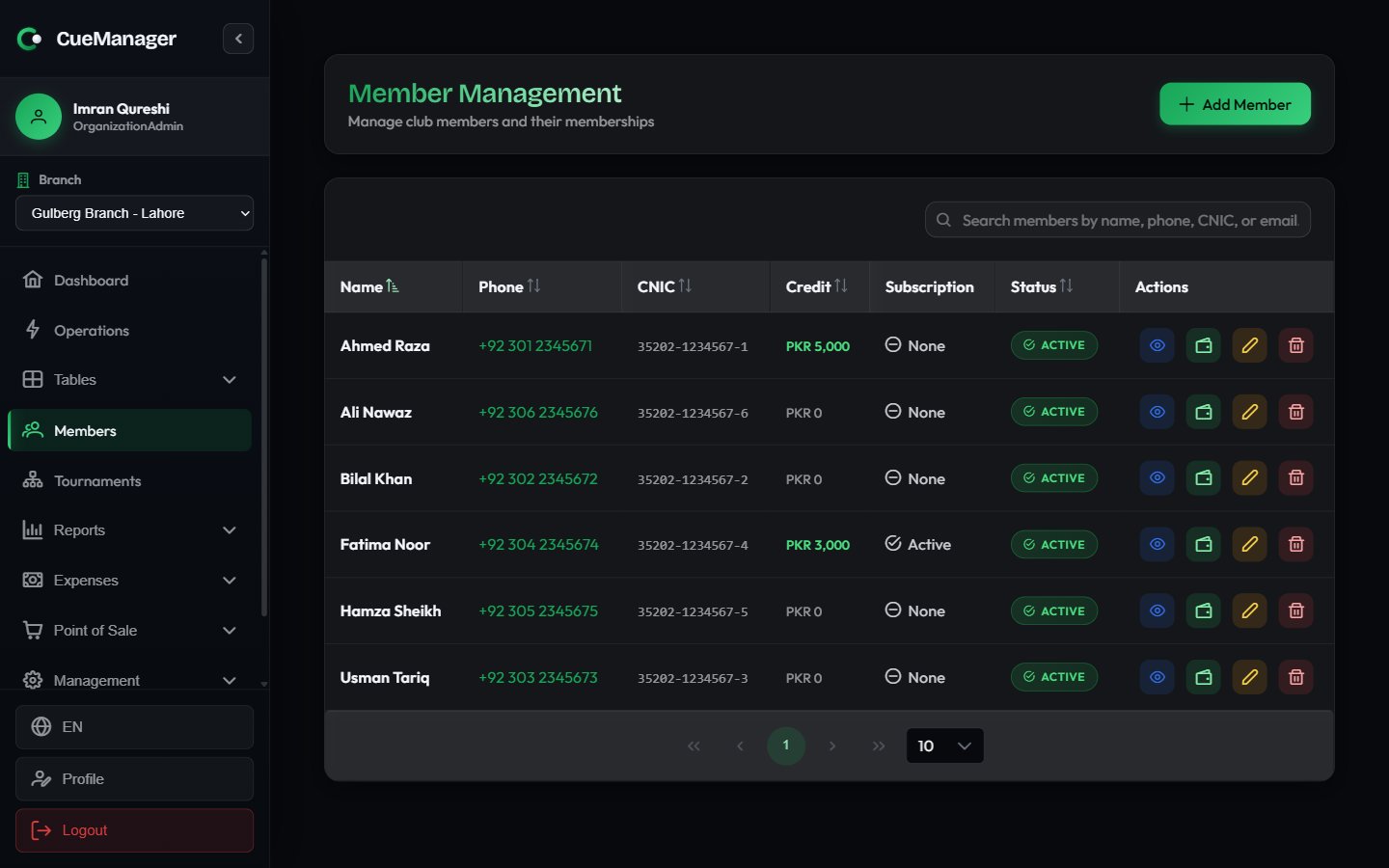 | Column | What it shows |
| ---------------- | ------------------------------------------------------------------------------------------------------ |
| **Name** | The member's full name, as it appears in session and tab pickers |
| **Phone** | Tap or click to dial |
| **CNIC** | National ID number |
| **Credit** | Prepaid wallet balance — see [Wallets and credit](/members/wallets-and-credit) |
| **Subscription** | **Active** if the member holds a live [membership plan](/members/membership-plans), otherwise **None** |
| **Status** | **Active** or **Inactive** membership |
Each row has four actions: **View Profile**, **Top up credit**, **Edit Member**, and **Delete Member**.
Members belong to the organization, not to a single branch. A member registered at Gulberg Branch can play and pay at any of your [branches](/admin/branches).
## Creating a member
Click **Add Member** in the page header. The **Create Member** dialog opens.
**Member Name**, **Phone Number**, and **CNIC Number** are required. CNIC uses the `12345-1234567-1` format and the field masks your typing to match.
**WhatsApp Number**, **Email Address**, **Emergency Contact Name**, **Emergency Contact Phone**, **Date of Birth**, and **Address** are all optional. A WhatsApp number lets you send payment reminders from the [Member balances report](/club/reports).
Click **Create Member**. The member appears in the list immediately and is selectable in the [session start dialog](/sessions/starting-a-session), the [POS terminal](/pos/pos-terminal), and [customer tabs](/pos/customer-tabs).
When you reopen the form with **Edit Member**, it gains an **Active Membership** checkbox. Clearing it marks the member inactive without removing their history.
**Delete Member** removes the member record permanently and cannot be undone. If someone has simply stopped coming, edit them and clear **Active Membership** instead so their sessions, payments, and credit history stay intact.
## The member profile
Click **View Profile** on any row to open the full record. The header shows the member's name, phone, email, and CNIC, an **Active Subscription** tag when a plan is live, and two buttons: **Recharge Credit** and **Edit**.
| Column | What it shows |
| ---------------- | ------------------------------------------------------------------------------------------------------ |
| **Name** | The member's full name, as it appears in session and tab pickers |
| **Phone** | Tap or click to dial |
| **CNIC** | National ID number |
| **Credit** | Prepaid wallet balance — see [Wallets and credit](/members/wallets-and-credit) |
| **Subscription** | **Active** if the member holds a live [membership plan](/members/membership-plans), otherwise **None** |
| **Status** | **Active** or **Inactive** membership |
Each row has four actions: **View Profile**, **Top up credit**, **Edit Member**, and **Delete Member**.
Members belong to the organization, not to a single branch. A member registered at Gulberg Branch can play and pay at any of your [branches](/admin/branches).
## Creating a member
Click **Add Member** in the page header. The **Create Member** dialog opens.
**Member Name**, **Phone Number**, and **CNIC Number** are required. CNIC uses the `12345-1234567-1` format and the field masks your typing to match.
**WhatsApp Number**, **Email Address**, **Emergency Contact Name**, **Emergency Contact Phone**, **Date of Birth**, and **Address** are all optional. A WhatsApp number lets you send payment reminders from the [Member balances report](/club/reports).
Click **Create Member**. The member appears in the list immediately and is selectable in the [session start dialog](/sessions/starting-a-session), the [POS terminal](/pos/pos-terminal), and [customer tabs](/pos/customer-tabs).
When you reopen the form with **Edit Member**, it gains an **Active Membership** checkbox. Clearing it marks the member inactive without removing their history.
**Delete Member** removes the member record permanently and cannot be undone. If someone has simply stopped coming, edit them and clear **Active Membership** instead so their sessions, payments, and credit history stay intact.
## The member profile
Click **View Profile** on any row to open the full record. The header shows the member's name, phone, email, and CNIC, an **Active Subscription** tag when a plan is live, and two buttons: **Recharge Credit** and **Edit**.
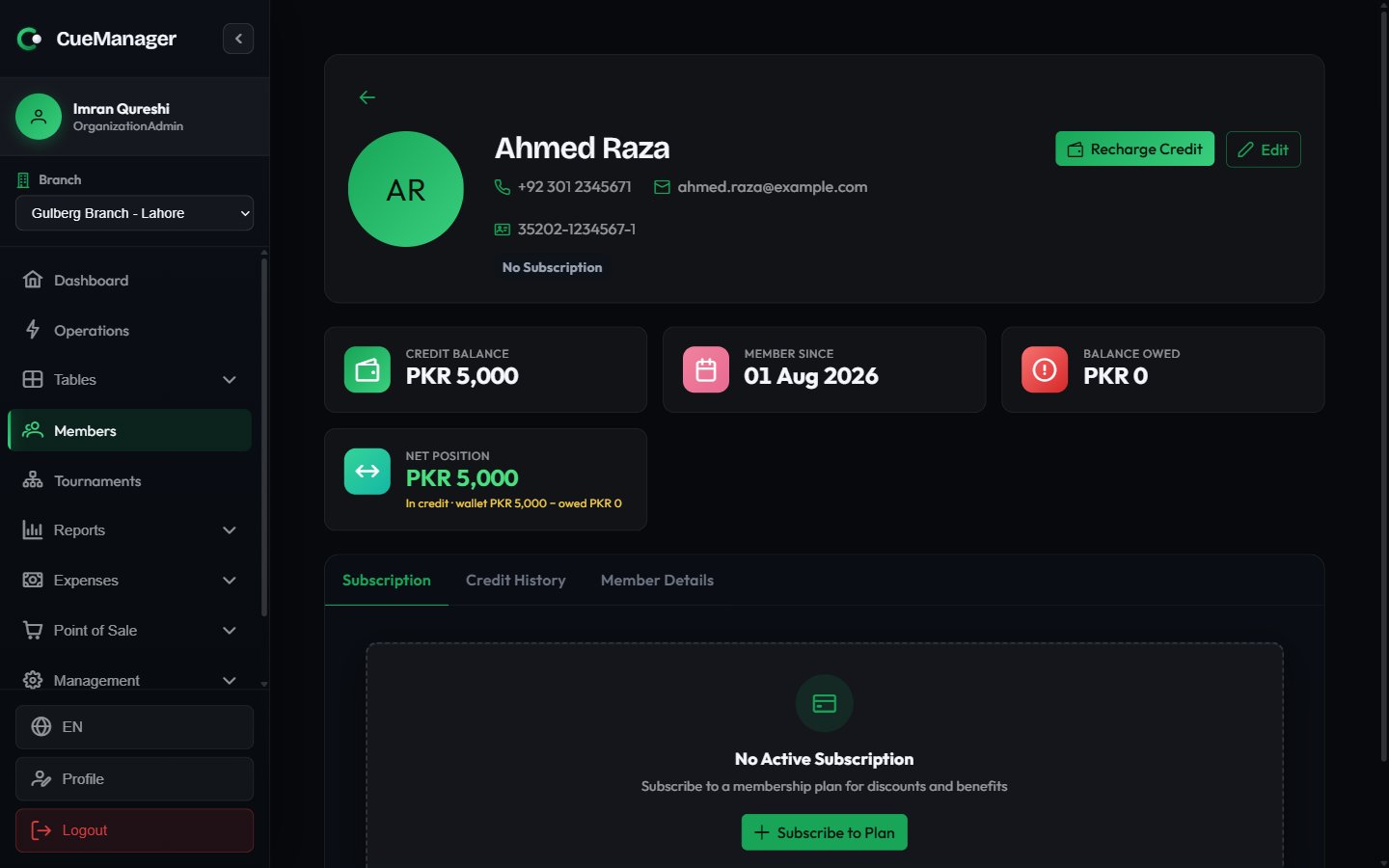 Four cards summarise the member's money:
| Card | Meaning |
| ------------------ | ------------------------------------------------------------------------------------------------- |
| **Credit Balance** | Prepaid wallet available to spend, with an "expiring soon" note when credit lapses within 30 days |
| **Member Since** | Date the member was registered |
| **Balance Owed** | Unpaid amounts, broken down into tab and session balances |
| **Net Position** | Wallet minus what they owe, shown as either in credit or owing |
Below the cards, three tabs hold the detail:
* **Subscription** — the current membership plan, renewal date, subscription history, and payment history. Covered in [Membership plans](/members/membership-plans).
* **Credit History** — every wallet transaction with date, type, amount, balance after, description, and expiry. Covered in [Wallets and credit](/members/wallets-and-credit).
* **Member Details** — the full contact record, including WhatsApp, date of birth, address, and emergency contact.
## Members with unpaid sessions
CueManager blocks a member from starting a new session while they have an overdue unpaid session share. The grace period is 10 days: a session bill older than that with an unpaid balance for that member stops the next session start, and the error names the member, the number of unpaid sessions, and the outstanding amount.
Clear the balance first — take payment against the open [customer tab](/pos/customer-tabs), or settle the session at [checkout](/sessions/checkout-and-payments) — then start the new session.
To see everyone in this position at once, run the **Member Balances** report, which combines open tab balances and unpaid session shares and can send a WhatsApp reminder per member. See [Reports](/club/reports).
Four cards summarise the member's money:
| Card | Meaning |
| ------------------ | ------------------------------------------------------------------------------------------------- |
| **Credit Balance** | Prepaid wallet available to spend, with an "expiring soon" note when credit lapses within 30 days |
| **Member Since** | Date the member was registered |
| **Balance Owed** | Unpaid amounts, broken down into tab and session balances |
| **Net Position** | Wallet minus what they owe, shown as either in credit or owing |
Below the cards, three tabs hold the detail:
* **Subscription** — the current membership plan, renewal date, subscription history, and payment history. Covered in [Membership plans](/members/membership-plans).
* **Credit History** — every wallet transaction with date, type, amount, balance after, description, and expiry. Covered in [Wallets and credit](/members/wallets-and-credit).
* **Member Details** — the full contact record, including WhatsApp, date of birth, address, and emergency contact.
## Members with unpaid sessions
CueManager blocks a member from starting a new session while they have an overdue unpaid session share. The grace period is 10 days: a session bill older than that with an unpaid balance for that member stops the next session start, and the error names the member, the number of unpaid sessions, and the outstanding amount.
Clear the balance first — take payment against the open [customer tab](/pos/customer-tabs), or settle the session at [checkout](/sessions/checkout-and-payments) — then start the new session.
To see everyone in this position at once, run the **Member Balances** report, which combines open tab balances and unpaid session shares and can send a WhatsApp reminder per member. See [Reports](/club/reports).