> ## Documentation Index
> Fetch the complete documentation index at: https://docs.getcuemanager.com/llms.txt
> Use this file to discover all available pages before exploring further.
# Membership plans
> Create plans with session discounts — up to free play.
A membership plan is a recurring club membership you sell to members: they pay a monthly, quarterly, or yearly fee, and in return their session billing is discounted by a percentage you choose. Set the discount to 100% and the member plays free.
These are your club's own plans for your customers. They are not the SaaS subscription that bills your club for CueManager — that lives in [Subscription and billing](/admin/subscription-billing).
## Creating a plan
Open **Management > Membership Plans** from the sidebar. The page needs the **Settings / Edit** permission.
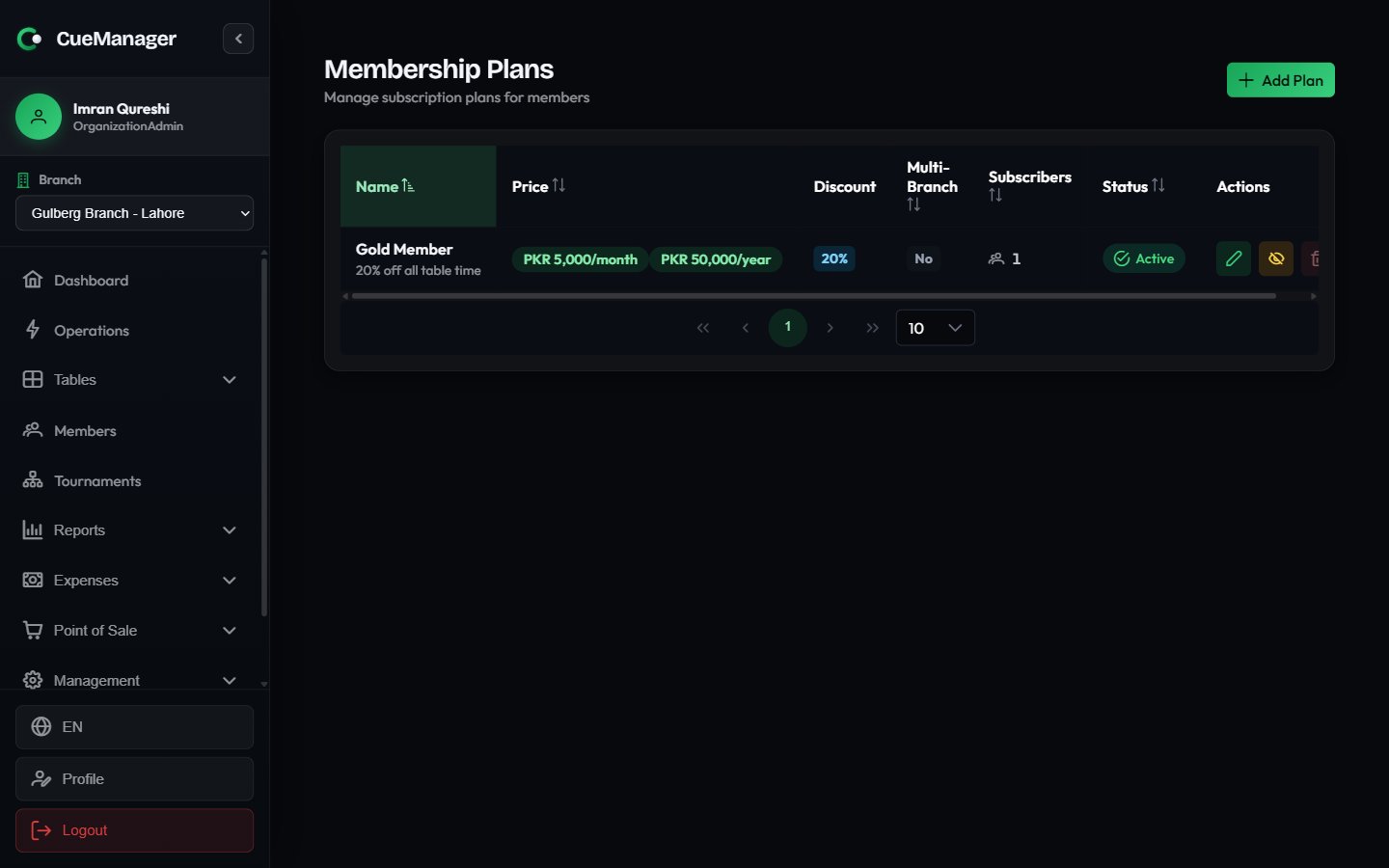 Click **Add Plan** to open **Create Membership Plan**.
| Field | Notes |
| ------------------------------ | ------------------------------------------------------------------------------------------------------------------------------------------------------ |
| **Plan Name** | Required, for example "Gold Member" |
| **Description** | Optional. Shown under the plan name in the table |
| **Price (per billing period)** | Required. The amount charged once per interval |
| **Billing Interval** | **Monthly**, **Quarterly**, or **Annual** |
| **Annual price (optional)** | Set a yearly price to also offer the plan billed annually. Leave blank to offer only the base interval. Hidden when the interval is already **Annual** |
| **Session Discount** | 0–100%. 100% means unlimited free play; lower values discount the member's own share of session billing |
| **Multi-Branch Access** | When checked, members can use the plan at any branch. Unchecked, it applies only at the branch that owns the plan |
Click **Create** to save. A "Gold Member — 20% off" plan at Rs 2,000 per month with a 20% session discount is a typical starting point.
The plan list shows **Price**, **Discount** (the percentage, or **Free play** at 100%), **Multi-Branch**, **Subscribers** (active subscriber count), and **Status**. Row actions are **Edit Plan**, **Activate** / **Deactivate**, and **Delete Plan**.
**Delete Plan** is permanent and is disabled while a plan still has active subscribers. To stop selling a plan without touching existing members, use **Deactivate** — it disappears from the subscribe picker while current subscriptions keep running.
## Assigning a plan to a member
Go to **Members**, click **View Profile** on the member, and open the **Subscription** tab.
Click **Subscribe to Plan**. The **Subscribe to Membership Plan** dialog opens.
**Select Plan** lists active plans with their prices. If the plan offers both a base interval and an annual price, a **Billing Interval** picker appears with the exact amount for each choice.
**Payment Method** is either **Manual** (you collected the fee at the counter) or **Automatic (Stripe)**.
Click **Subscribe**. The member's profile now shows an **Active Subscription** tag, and the **Subscription** column in the member list flips to **Active**.
Once subscribed, the **Current Subscription** card shows **Plan**, **Price**, **Started**, **Next Renewal** (with a days-remaining badge when renewal is close), and **Payment**. Two buttons sit below it: **Renew** extends the subscription by another period, and **Cancel** ends it.
Cancelling a member subscription cannot be undone. To put the member back on the plan you subscribe them again, which starts a fresh period.
Below the card, **Subscription History** lists past subscriptions with their period and status, and **Payment History** lists one row per paid period with plan, paid date, period, and amount.
### Subscription statuses
| Status | Meaning |
| ------------- | --------------------------------------- |
| **Trialing** | In a trial period |
| **Active** | Live and granting the discount |
| **Past Due** | Payment is overdue |
| **Cancelled** | Ended by staff |
| **Expired** | Ran past its period end without renewal |
| **Paused** | Temporarily suspended |
Only **Active** subscriptions that have not passed their period end grant a discount.
## How the discount applies at billing
The discount is resolved when a session starts, not when it ends. CueManager looks up each player's active subscriptions, keeps the best discount per player, and stores it on the session. See [How billing works](/concepts/how-billing-works) for the underlying pricing models.
* **Frame pricing** — the discount applies per player, to that player's own share of the frames they lost. In a doubles session each of the four players carries their own percentage, and the checkout shows a small `-20%` chip next to any discounted player's amount.
* **Hourly and per-minute pricing** — the session produces one bill, so the best discount among the players applies to the whole amount. Checkout shows it as a **Member Discount (20%)** line above the total.
* **100% plans** — any player holding a 100% plan makes the whole session free. The session is flagged **MEMBER SESSION - FREE PLAY** and checkout confirms the session is free for members with active subscriptions.
A plan only counts at a branch if it belongs to that branch or has **Multi-Branch Access** enabled.
Because the discount is captured at session start, editing a plan's percentage or cancelling a subscription mid-session does not change a session already running. The change applies from the next session onwards.
## Related pages
Register members and read their profiles.
Prepaid balances members spend at checkout.
Where the discount shows up on the bill.
Pricing modes, billing types, and who pays.
Click **Add Plan** to open **Create Membership Plan**.
| Field | Notes |
| ------------------------------ | ------------------------------------------------------------------------------------------------------------------------------------------------------ |
| **Plan Name** | Required, for example "Gold Member" |
| **Description** | Optional. Shown under the plan name in the table |
| **Price (per billing period)** | Required. The amount charged once per interval |
| **Billing Interval** | **Monthly**, **Quarterly**, or **Annual** |
| **Annual price (optional)** | Set a yearly price to also offer the plan billed annually. Leave blank to offer only the base interval. Hidden when the interval is already **Annual** |
| **Session Discount** | 0–100%. 100% means unlimited free play; lower values discount the member's own share of session billing |
| **Multi-Branch Access** | When checked, members can use the plan at any branch. Unchecked, it applies only at the branch that owns the plan |
Click **Create** to save. A "Gold Member — 20% off" plan at Rs 2,000 per month with a 20% session discount is a typical starting point.
The plan list shows **Price**, **Discount** (the percentage, or **Free play** at 100%), **Multi-Branch**, **Subscribers** (active subscriber count), and **Status**. Row actions are **Edit Plan**, **Activate** / **Deactivate**, and **Delete Plan**.
**Delete Plan** is permanent and is disabled while a plan still has active subscribers. To stop selling a plan without touching existing members, use **Deactivate** — it disappears from the subscribe picker while current subscriptions keep running.
## Assigning a plan to a member
Go to **Members**, click **View Profile** on the member, and open the **Subscription** tab.
Click **Subscribe to Plan**. The **Subscribe to Membership Plan** dialog opens.
**Select Plan** lists active plans with their prices. If the plan offers both a base interval and an annual price, a **Billing Interval** picker appears with the exact amount for each choice.
**Payment Method** is either **Manual** (you collected the fee at the counter) or **Automatic (Stripe)**.
Click **Subscribe**. The member's profile now shows an **Active Subscription** tag, and the **Subscription** column in the member list flips to **Active**.
Once subscribed, the **Current Subscription** card shows **Plan**, **Price**, **Started**, **Next Renewal** (with a days-remaining badge when renewal is close), and **Payment**. Two buttons sit below it: **Renew** extends the subscription by another period, and **Cancel** ends it.
Cancelling a member subscription cannot be undone. To put the member back on the plan you subscribe them again, which starts a fresh period.
Below the card, **Subscription History** lists past subscriptions with their period and status, and **Payment History** lists one row per paid period with plan, paid date, period, and amount.
### Subscription statuses
| Status | Meaning |
| ------------- | --------------------------------------- |
| **Trialing** | In a trial period |
| **Active** | Live and granting the discount |
| **Past Due** | Payment is overdue |
| **Cancelled** | Ended by staff |
| **Expired** | Ran past its period end without renewal |
| **Paused** | Temporarily suspended |
Only **Active** subscriptions that have not passed their period end grant a discount.
## How the discount applies at billing
The discount is resolved when a session starts, not when it ends. CueManager looks up each player's active subscriptions, keeps the best discount per player, and stores it on the session. See [How billing works](/concepts/how-billing-works) for the underlying pricing models.
* **Frame pricing** — the discount applies per player, to that player's own share of the frames they lost. In a doubles session each of the four players carries their own percentage, and the checkout shows a small `-20%` chip next to any discounted player's amount.
* **Hourly and per-minute pricing** — the session produces one bill, so the best discount among the players applies to the whole amount. Checkout shows it as a **Member Discount (20%)** line above the total.
* **100% plans** — any player holding a 100% plan makes the whole session free. The session is flagged **MEMBER SESSION - FREE PLAY** and checkout confirms the session is free for members with active subscriptions.
A plan only counts at a branch if it belongs to that branch or has **Multi-Branch Access** enabled.
Because the discount is captured at session start, editing a plan's percentage or cancelling a subscription mid-session does not change a session already running. The change applies from the next session onwards.
## Related pages
Register members and read their profiles.
Prepaid balances members spend at checkout.
Where the discount shows up on the bill.
Pricing modes, billing types, and who pays.