> ## Documentation Index
> Fetch the complete documentation index at: https://docs.getcuemanager.com/llms.txt
> Use this file to discover all available pages before exploring further.
# Wallets and credit
> Top up member wallets and let members pay from their balance.
Every member has a prepaid wallet. Staff top it up with cash at the counter, and the member then spends that balance at session checkout, at the POS, or when settling a tab — no cash changes hands at the point of play.
## Recharging a wallet
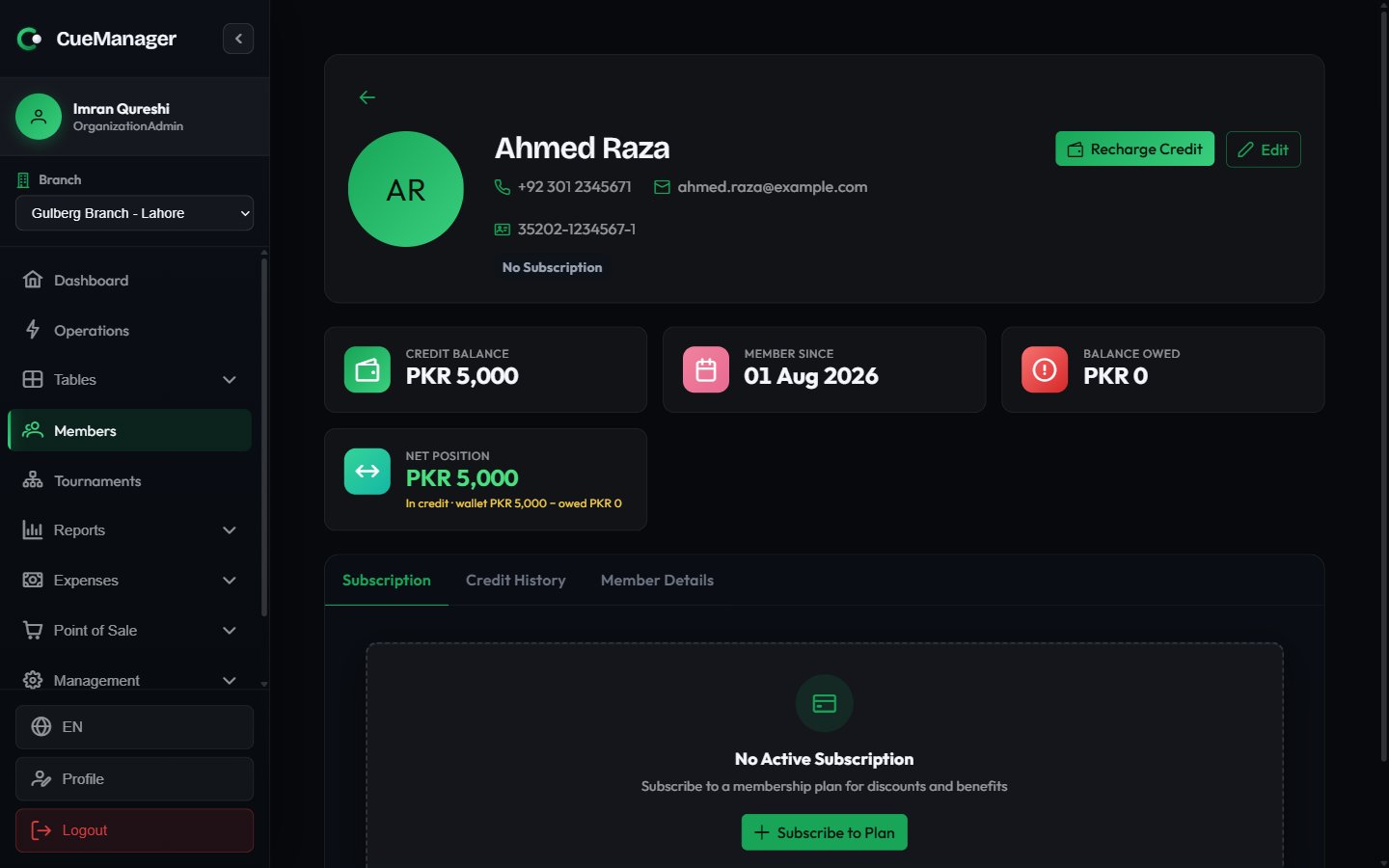
You can open the recharge dialog two ways: click the **Top up credit** action on a row in the member list, or click **Recharge Credit** on the [member profile](/members/managing-members).
The dialog header repeats the member's name, phone, and **Current Balance** so you are topping up the right person.
**Quick Select** offers Rs 500, Rs 1,000, Rs 2,000, and Rs 5,000. For anything else, type into **Recharge Amount**. The minimum recharge is Rs 100.
**Valid For** controls when the credit expires: 6, 12, 18, or 24 months from today. It defaults to 12 months.
The balance preview shows **Current Balance**, **Adding**, and **New Balance**. Add an optional **Description** — for example "Cash top-up at counter" — then click **Recharge Credit**.
 Credit expires. Each top-up carries its own expiry date, and only unexpired credit counts towards the available balance. The **Credit Balance** card warns you when an amount is due to lapse within 30 days.
## Spending credit
At the point of payment, **Credit** appears alongside Cash, Card, JazzCash, Easypaisa, Raast, and Bank transfer wherever a member is attached to the transaction:
* **Session checkout** — pick **Credit** as the payment method when ending a session for a member. See [Checkout and payments](/sessions/checkout-and-payments).
* **POS checkout** — select the member on the sale, then choose **Credit**. See [POS terminal](/pos/pos-terminal).
* **Settling a tab** — tender part or all of a member-linked tab against their wallet. See [Customer tabs](/pos/customer-tabs).
At the POS and on tab settlement, a wallet chip appears next to the payment choice showing `Wallet: Rs 2,400 available`, plus any amount expiring soon. The chip turns red when the balance will not cover the amount you are tendering, so you can switch to cash before you commit.
The server checks the balance again when the payment is submitted. If another till spent the credit in the meantime, the payment is rejected with an insufficient-balance message rather than pushing the wallet negative.
## Credit cannot be spent offline
CueManager keeps working without internet — see [Offline and sync](/concepts/offline-and-sync) — but the wallet is the one exception.
While the connection is down, the **Credit** payment method is disabled at session checkout and the note **Member wallet unavailable offline** appears under the payment picker. A wallet balance lives on the server and another till may already have spent it, so it cannot be verified locally. Take cash, or use **Add to tab (pay later)** and settle from the wallet once you are back online.
If a checkout already had **Credit** selected when the line dropped, CueManager moves it back to Cash. The option re-enables itself as soon as the server is reachable again.
## Credit history
The **Credit History** tab on the member profile lists every wallet movement, newest first, with **Date**, **Type**, **Amount**, **Balance After**, **Description**, and **Expiry**.
| Type | Effect on the balance |
| ------------- | -------------------------------------------------------------------- |
| **Recharge** | Adds credit — a staff top-up |
| **Deduction** | Removes credit — a session, POS sale, or tab settled from the wallet |
| **Refund** | Adds credit back, valid for 12 months |
| **Expired** | Removes credit that passed its expiry date |
## Where balances appear
| Place | What it shows |
| -------------------------------------- | ------------------------------------------------------------------------------------------------------------------------------------------------------- |
| **Credit** column in the member list | Each member's wallet balance at a glance |
| **Credit Balance** card on the profile | Available balance plus an expiring-soon warning |
| **Net Position** card on the profile | Wallet netted against what the member owes, labelled either in credit or owes |
| Wallet chip at POS and tab settlement | Available balance for the member on this transaction, red if short |
| **Member Balances** report | What members *owe* — open tab balances plus unpaid session shares, with a **Remind** action that sends a WhatsApp message. See [Reports](/club/reports) |
The **Member Balances** report is about debt, not wallets. A member can hold a healthy wallet balance and still appear there if they left charges on an open tab. The **Net Position** card on their profile reconciles the two figures into one number.
Credit expires. Each top-up carries its own expiry date, and only unexpired credit counts towards the available balance. The **Credit Balance** card warns you when an amount is due to lapse within 30 days.
## Spending credit
At the point of payment, **Credit** appears alongside Cash, Card, JazzCash, Easypaisa, Raast, and Bank transfer wherever a member is attached to the transaction:
* **Session checkout** — pick **Credit** as the payment method when ending a session for a member. See [Checkout and payments](/sessions/checkout-and-payments).
* **POS checkout** — select the member on the sale, then choose **Credit**. See [POS terminal](/pos/pos-terminal).
* **Settling a tab** — tender part or all of a member-linked tab against their wallet. See [Customer tabs](/pos/customer-tabs).
At the POS and on tab settlement, a wallet chip appears next to the payment choice showing `Wallet: Rs 2,400 available`, plus any amount expiring soon. The chip turns red when the balance will not cover the amount you are tendering, so you can switch to cash before you commit.
The server checks the balance again when the payment is submitted. If another till spent the credit in the meantime, the payment is rejected with an insufficient-balance message rather than pushing the wallet negative.
## Credit cannot be spent offline
CueManager keeps working without internet — see [Offline and sync](/concepts/offline-and-sync) — but the wallet is the one exception.
While the connection is down, the **Credit** payment method is disabled at session checkout and the note **Member wallet unavailable offline** appears under the payment picker. A wallet balance lives on the server and another till may already have spent it, so it cannot be verified locally. Take cash, or use **Add to tab (pay later)** and settle from the wallet once you are back online.
If a checkout already had **Credit** selected when the line dropped, CueManager moves it back to Cash. The option re-enables itself as soon as the server is reachable again.
## Credit history
The **Credit History** tab on the member profile lists every wallet movement, newest first, with **Date**, **Type**, **Amount**, **Balance After**, **Description**, and **Expiry**.
| Type | Effect on the balance |
| ------------- | -------------------------------------------------------------------- |
| **Recharge** | Adds credit — a staff top-up |
| **Deduction** | Removes credit — a session, POS sale, or tab settled from the wallet |
| **Refund** | Adds credit back, valid for 12 months |
| **Expired** | Removes credit that passed its expiry date |
## Where balances appear
| Place | What it shows |
| -------------------------------------- | ------------------------------------------------------------------------------------------------------------------------------------------------------- |
| **Credit** column in the member list | Each member's wallet balance at a glance |
| **Credit Balance** card on the profile | Available balance plus an expiring-soon warning |
| **Net Position** card on the profile | Wallet netted against what the member owes, labelled either in credit or owes |
| Wallet chip at POS and tab settlement | Available balance for the member on this transaction, red if short |
| **Member Balances** report | What members *owe* — open tab balances plus unpaid session shares, with a **Remind** action that sends a WhatsApp message. See [Reports](/club/reports) |
The **Member Balances** report is about debt, not wallets. A member can hold a healthy wallet balance and still appear there if they left charges on an open tab. The **Net Position** card on their profile reconciles the two figures into one number.