> ## Documentation Index
> Fetch the complete documentation index at: https://docs.getcuemanager.com/llms.txt
> Use this file to discover all available pages before exploring further.
# Running a session
> Track time, record frame results, and add items while play continues.
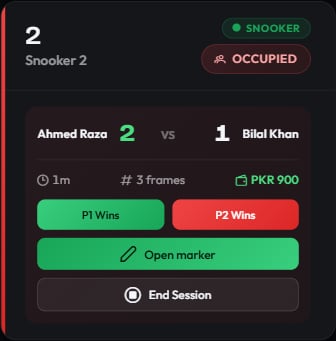
Once a session starts, its table card on [the live floor](/tables/live-floor) turns into a live panel: who is playing, the frame score, how long they have been on, and what they owe so far. Everything on this page happens from that panel while play continues.
 ## What the panel shows
| Element | Meaning |
| ---------------------------- | --------------------------------------------------------------------------------------------------------------------------- |
| Player names and scores | Ahmed Raza 3 — 2 Bilal Khan. In doubles the panel shows a **DOUBLES** badge and labels the sides **Team 1** and **Team 2**. |
| Clock | Time elapsed since the session started, updated every minute. |
| Frame count or pricing label | Frame sessions show "5 frames"; time-based sessions show **Hourly** or **Per minute**. |
| Running total | What the table owes right now. Time-based totals are marked **est.** because they are still climbing. |
The leading player or team is highlighted, so a glance tells you who is ahead.
## Recording a frame result
Frame-priced sessions get two buttons under the score: **P1 Wins** and **P2 Wins** (**Team 1 Wins** and **Team 2 Wins** in doubles). Press the one matching who took the frame.
Each press records a completed frame, adds it to the score, and charges it — **to the loser**. That is the core of the frame model: the player or team who lost the frame pays for it. In doubles the frame costs twice the singles rate and the losing pair splits it equally.
For a branch rate of Rs 500 a frame, a singles frame adds Rs 500 to the loser's share, and a doubles frame adds Rs 1,000 split as Rs 500 each. The full arithmetic is in [How billing works](/concepts/how-billing-works).
Time-based sessions have no frame buttons — their bill comes from the clock.
## Live frame alerts
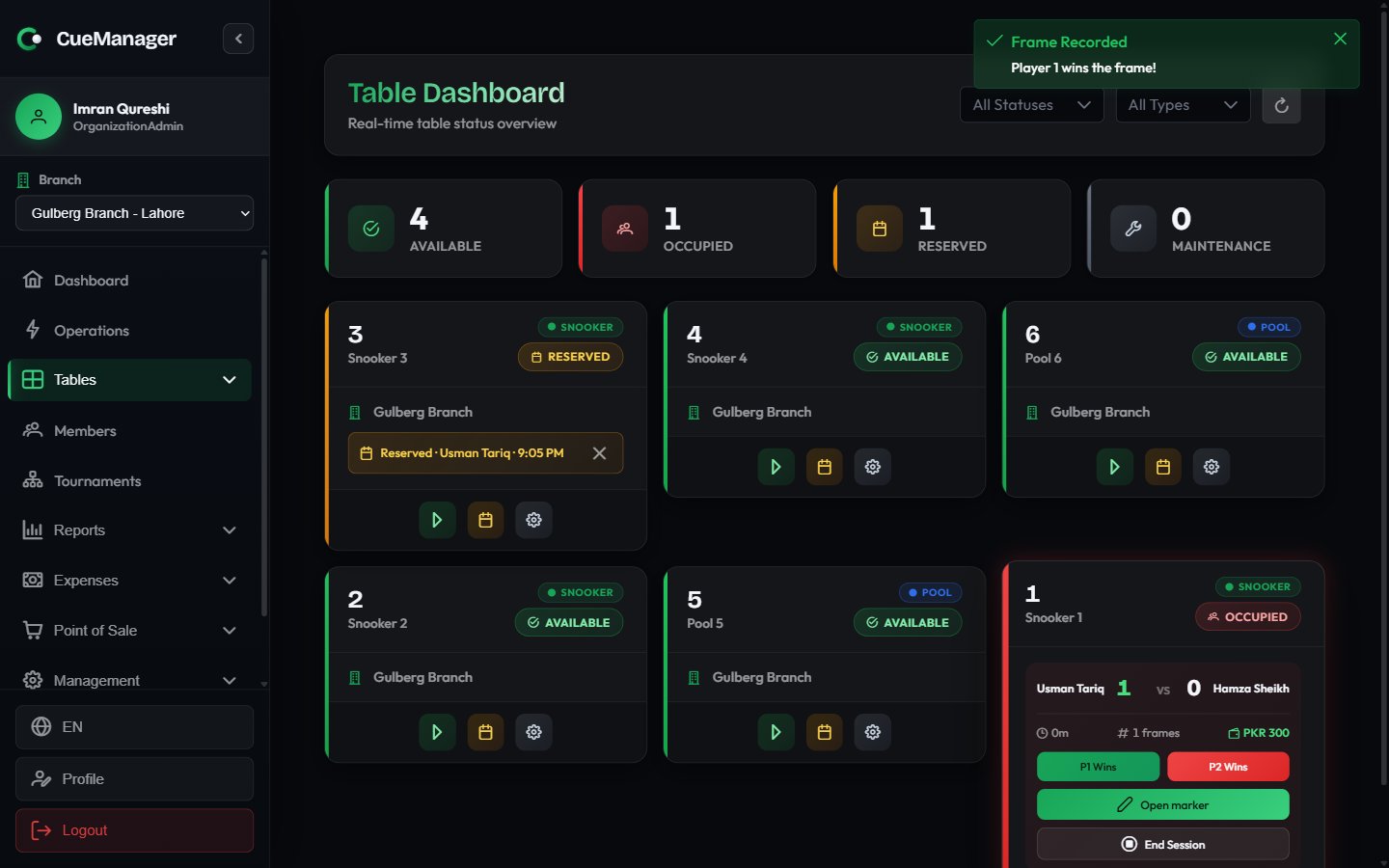
When a frame ends, staff anywhere in the club get a dialog, regardless of which page they are on.
## What the panel shows
| Element | Meaning |
| ---------------------------- | --------------------------------------------------------------------------------------------------------------------------- |
| Player names and scores | Ahmed Raza 3 — 2 Bilal Khan. In doubles the panel shows a **DOUBLES** badge and labels the sides **Team 1** and **Team 2**. |
| Clock | Time elapsed since the session started, updated every minute. |
| Frame count or pricing label | Frame sessions show "5 frames"; time-based sessions show **Hourly** or **Per minute**. |
| Running total | What the table owes right now. Time-based totals are marked **est.** because they are still climbing. |
The leading player or team is highlighted, so a glance tells you who is ahead.
## Recording a frame result
Frame-priced sessions get two buttons under the score: **P1 Wins** and **P2 Wins** (**Team 1 Wins** and **Team 2 Wins** in doubles). Press the one matching who took the frame.
Each press records a completed frame, adds it to the score, and charges it — **to the loser**. That is the core of the frame model: the player or team who lost the frame pays for it. In doubles the frame costs twice the singles rate and the losing pair splits it equally.
For a branch rate of Rs 500 a frame, a singles frame adds Rs 500 to the loser's share, and a doubles frame adds Rs 1,000 split as Rs 500 each. The full arithmetic is in [How billing works](/concepts/how-billing-works).
Time-based sessions have no frame buttons — their bill comes from the clock.
## Live frame alerts
When a frame ends, staff anywhere in the club get a dialog, regardless of which page they are on.
 There are two kinds:
* **Frame Finished** — a snooker frame scored on the marker. The winner is already known, the dialog shows the final score and high breaks, and you choose **Confirm Result** to acknowledge it.
* **Record Frame Result** — a frame the table camera believes has ended, where the winner is unknown. The dialog asks **Who won this frame?**; pick a player, add an optional note, and choose **Record Result**. **Dismiss** closes it without charging anything.
If someone else answers an alert first, it disappears from every other screen — the same frame is never billed twice. Alerts raised while nobody was connected are replayed once a device comes back.
## Opening the snooker marker
Snooker sessions show an **Open marker** button. It opens the ball-by-ball scoring screen for the current frame, including the shareable spectator scoreboard. See [Snooker scoring](/sessions/snooker-marker).
## Adding food and drinks
Sales made at the POS can be attached to a running session instead of being taken separately. In the [POS terminal](/pos/pos-terminal), build the cart and charge it to the table — a Chai at Rs 100 goes onto the table the customer is sitting at.
At checkout those sales appear under **POS Charges (already paid)** as informational lines. They are shown so staff can see the full picture; they are not added to the amount due again. To make the drinks payable later instead, put them on a [customer tab](/pos/customer-tabs).
## When the connection drops
The panel keeps working offline:
* Frames you record are saved on the device and marked **Saved offline**. The score and running total already include them.
* A pending-frames badge on the panel counts anything not yet sent to the server.
* A session whose checkout is queued shows **Ending — pending sync**, and its buttons are withdrawn so nothing is recorded twice on replay.
See [Offline and sync](/concepts/offline-and-sync) for how the queue drains and how conflicts are resolved.
## Finishing up
When the group is done, choose **End Session** on the panel. That opens the checkout, covered in [Checkout and payments](/sessions/checkout-and-payments).
## Related pages
* [Starting a session](/sessions/starting-a-session) — the start dialog
* [Snooker scoring](/sessions/snooker-marker) — ball-by-ball marking and the spectator screen
* [POS terminal](/pos/pos-terminal) — charging items to a table
* [Reports](/club/reports) — session and table-activity reporting
There are two kinds:
* **Frame Finished** — a snooker frame scored on the marker. The winner is already known, the dialog shows the final score and high breaks, and you choose **Confirm Result** to acknowledge it.
* **Record Frame Result** — a frame the table camera believes has ended, where the winner is unknown. The dialog asks **Who won this frame?**; pick a player, add an optional note, and choose **Record Result**. **Dismiss** closes it without charging anything.
If someone else answers an alert first, it disappears from every other screen — the same frame is never billed twice. Alerts raised while nobody was connected are replayed once a device comes back.
## Opening the snooker marker
Snooker sessions show an **Open marker** button. It opens the ball-by-ball scoring screen for the current frame, including the shareable spectator scoreboard. See [Snooker scoring](/sessions/snooker-marker).
## Adding food and drinks
Sales made at the POS can be attached to a running session instead of being taken separately. In the [POS terminal](/pos/pos-terminal), build the cart and charge it to the table — a Chai at Rs 100 goes onto the table the customer is sitting at.
At checkout those sales appear under **POS Charges (already paid)** as informational lines. They are shown so staff can see the full picture; they are not added to the amount due again. To make the drinks payable later instead, put them on a [customer tab](/pos/customer-tabs).
## When the connection drops
The panel keeps working offline:
* Frames you record are saved on the device and marked **Saved offline**. The score and running total already include them.
* A pending-frames badge on the panel counts anything not yet sent to the server.
* A session whose checkout is queued shows **Ending — pending sync**, and its buttons are withdrawn so nothing is recorded twice on replay.
See [Offline and sync](/concepts/offline-and-sync) for how the queue drains and how conflicts are resolved.
## Finishing up
When the group is done, choose **End Session** on the panel. That opens the checkout, covered in [Checkout and payments](/sessions/checkout-and-payments).
## Related pages
* [Starting a session](/sessions/starting-a-session) — the start dialog
* [Snooker scoring](/sessions/snooker-marker) — ball-by-ball marking and the spectator screen
* [POS terminal](/pos/pos-terminal) — charging items to a table
* [Reports](/club/reports) — session and table-activity reporting