> ## Documentation Index
> Fetch the complete documentation index at: https://docs.getcuemanager.com/llms.txt
> Use this file to discover all available pages before exploring further.
# Starting a session
> Put players on a table with the right game, pricing, and billing setup.
A session is one group's play on one table, from the moment you seat them to the moment you take payment. This page walks through the start dialog field by field. For the common case — two walk-ins playing frames at the branch rate — you only need to type two names and choose **Start Session**.
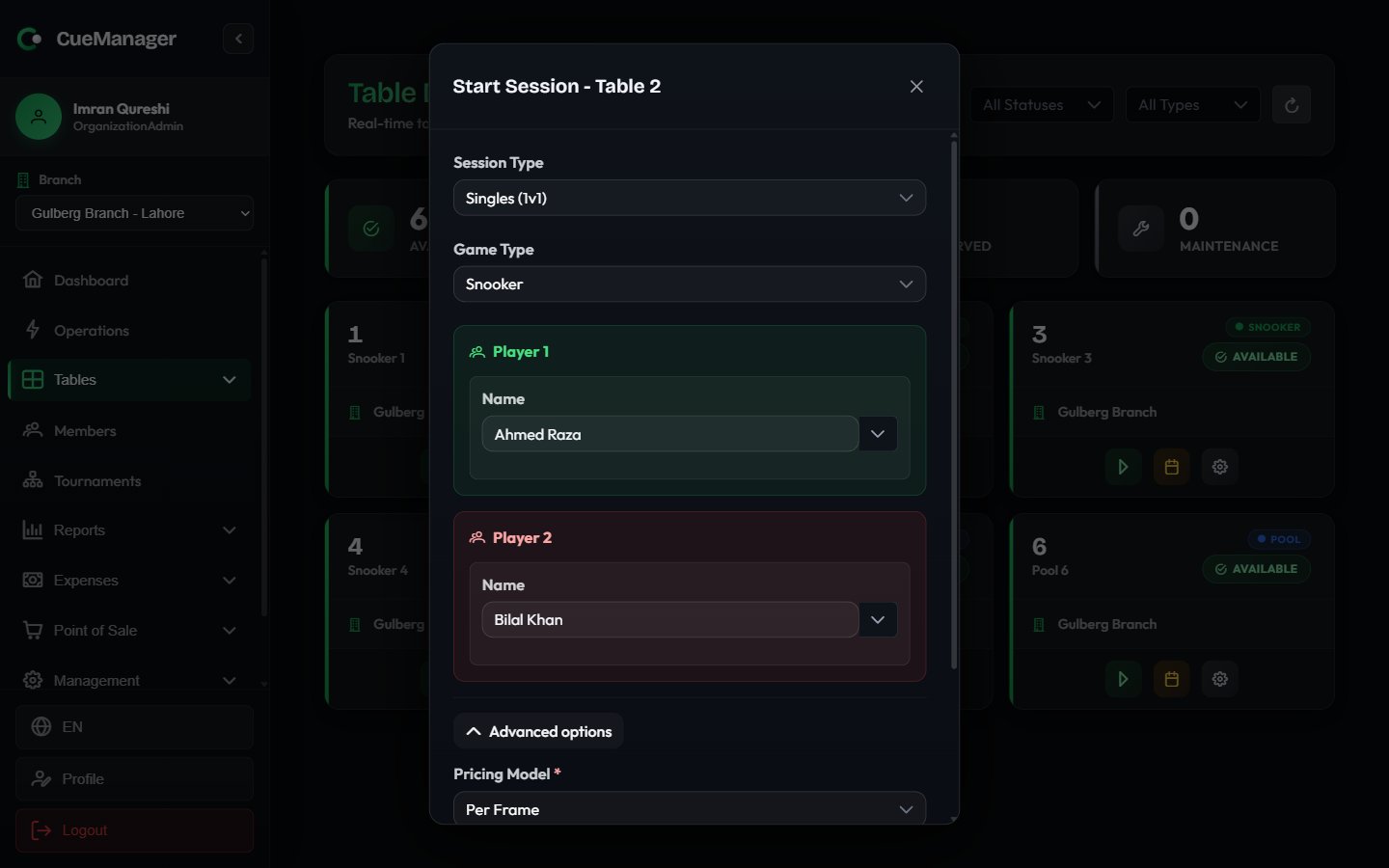 On [the live floor](/tables/live-floor), choose **Start Session** on an available table's card. The dialog header names the table, for example **Start Session - Table Snooker 1**.
If the table's camera is offline, a note appears at the top of the dialog warning that automatic frame-end detection will not work for this session. It never blocks you from starting.
| Option | Use it for |
| ----------------- | --------------------------------------------------------------- |
| **Singles (1v1)** | Two players, one against the other. The default. |
| **Doubles (2v2)** | Two pairs. Frames cost twice the singles rate. |
| **Practice** | One person on the table by themselves. |
| **Tournament** | Play that belongs to a [tournament](/club/tournaments) fixture. |
Choosing **Doubles** widens the dialog into two team panels and shows a banner confirming the doubled frame price, for example "Doubles: Frame price will be **2x** (Rs 1,000 per frame)".
**Snooker**, **8-Ball**, or **9-Ball**. Snooker tables offer all three and default to Snooker; pool tables offer only 8-Ball and 9-Ball and default to 8-Ball.
Only a Snooker session gets the **Open marker** button later, so pick the game correctly here if you intend to score ball by ball. See [Snooker scoring](/sessions/snooker-marker).
Each player has one field that does two jobs. Type a walk-in's name straight into it, or start typing and pick a registered member from the suggestions — the list shows the member's name and phone, and choosing one links the session to that member's record.
* **Singles**: **Player 1** and **Player 2**. Leave them blank and they default to "Player 1" and "Player 2".
* **Doubles**: Team 1 is **Player 1 Name** plus **Player 3 Name (Partner)**; Team 2 is **Player 2 Name** plus **Player 4 Name (Partner)**. All four are required.
Linking a member matters at checkout: it is what applies their membership discount, lets them pay from their [wallet](/members/wallets-and-credit), and puts the session in their playing history.
Pricing is collapsed by default, with a one-line summary next to it such as "Per frame · Rs 500/frame". Expand **Advanced options** to change it.
* **Pricing Model** — **Per Frame**, **Per Hour**, or **Per Minute**.
* **Billing Type** — shown for hourly and per-minute only: **Open-ended** (the clock runs until you end the session) or **Pre-paid**.
* **Pre-paid Minutes** — shown for pre-paid billing. The minutes the customer has paid for, which becomes the floor on billed time.
* **Base Frame Price** — shown for frame pricing, pre-filled from the branch rate for this table's type. In doubles the label reminds you that the charge will be 2x.
The default frame price comes from the branch's snooker or pool rate depending on the table. Change it here to override the rate for this one session only; permanent changes belong in [Branches](/admin/branches).
Before you commit, the dialog may show:
* **Member Session - Unlimited Play** — a linked player is on a 100% free-play plan. Only that player's share is free; anyone else at the table still pays, so the pricing fields stay live.
* **Member discount: 20% will be applied** — a linked player's [membership plan](/members/membership-plans) discount, applied to their share at checkout.
Choose **Start Session**. The table turns **Occupied** on every device and the card switches to the live session panel.
## After it starts
The session panel takes over the table's card with the score, a running timer, and the current total. From there you record frame results, open the marker, add POS items, and finally check out. Continue with [Running a session](/sessions/running-a-session).
Starting a session works offline. It is queued on the device and sent when the connection returns — see [Offline and sync](/concepts/offline-and-sync).
## Related pages
* [How billing works](/concepts/how-billing-works) — frame, hourly and per-minute pricing in detail
* [Running a session](/sessions/running-a-session) — frames, POS items, live alerts
* [Checkout and payments](/sessions/checkout-and-payments) — settling the bill
* [Managing members](/members/managing-members) — registering the players you link
On [the live floor](/tables/live-floor), choose **Start Session** on an available table's card. The dialog header names the table, for example **Start Session - Table Snooker 1**.
If the table's camera is offline, a note appears at the top of the dialog warning that automatic frame-end detection will not work for this session. It never blocks you from starting.
| Option | Use it for |
| ----------------- | --------------------------------------------------------------- |
| **Singles (1v1)** | Two players, one against the other. The default. |
| **Doubles (2v2)** | Two pairs. Frames cost twice the singles rate. |
| **Practice** | One person on the table by themselves. |
| **Tournament** | Play that belongs to a [tournament](/club/tournaments) fixture. |
Choosing **Doubles** widens the dialog into two team panels and shows a banner confirming the doubled frame price, for example "Doubles: Frame price will be **2x** (Rs 1,000 per frame)".
**Snooker**, **8-Ball**, or **9-Ball**. Snooker tables offer all three and default to Snooker; pool tables offer only 8-Ball and 9-Ball and default to 8-Ball.
Only a Snooker session gets the **Open marker** button later, so pick the game correctly here if you intend to score ball by ball. See [Snooker scoring](/sessions/snooker-marker).
Each player has one field that does two jobs. Type a walk-in's name straight into it, or start typing and pick a registered member from the suggestions — the list shows the member's name and phone, and choosing one links the session to that member's record.
* **Singles**: **Player 1** and **Player 2**. Leave them blank and they default to "Player 1" and "Player 2".
* **Doubles**: Team 1 is **Player 1 Name** plus **Player 3 Name (Partner)**; Team 2 is **Player 2 Name** plus **Player 4 Name (Partner)**. All four are required.
Linking a member matters at checkout: it is what applies their membership discount, lets them pay from their [wallet](/members/wallets-and-credit), and puts the session in their playing history.
Pricing is collapsed by default, with a one-line summary next to it such as "Per frame · Rs 500/frame". Expand **Advanced options** to change it.
* **Pricing Model** — **Per Frame**, **Per Hour**, or **Per Minute**.
* **Billing Type** — shown for hourly and per-minute only: **Open-ended** (the clock runs until you end the session) or **Pre-paid**.
* **Pre-paid Minutes** — shown for pre-paid billing. The minutes the customer has paid for, which becomes the floor on billed time.
* **Base Frame Price** — shown for frame pricing, pre-filled from the branch rate for this table's type. In doubles the label reminds you that the charge will be 2x.
The default frame price comes from the branch's snooker or pool rate depending on the table. Change it here to override the rate for this one session only; permanent changes belong in [Branches](/admin/branches).
Before you commit, the dialog may show:
* **Member Session - Unlimited Play** — a linked player is on a 100% free-play plan. Only that player's share is free; anyone else at the table still pays, so the pricing fields stay live.
* **Member discount: 20% will be applied** — a linked player's [membership plan](/members/membership-plans) discount, applied to their share at checkout.
Choose **Start Session**. The table turns **Occupied** on every device and the card switches to the live session panel.
## After it starts
The session panel takes over the table's card with the score, a running timer, and the current total. From there you record frame results, open the marker, add POS items, and finally check out. Continue with [Running a session](/sessions/running-a-session).
Starting a session works offline. It is queued on the device and sent when the connection returns — see [Offline and sync](/concepts/offline-and-sync).
## Related pages
* [How billing works](/concepts/how-billing-works) — frame, hourly and per-minute pricing in detail
* [Running a session](/sessions/running-a-session) — frames, POS items, live alerts
* [Checkout and payments](/sessions/checkout-and-payments) — settling the bill
* [Managing members](/members/managing-members) — registering the players you link