

Statuses
Open a tab
The Open Tabs view lists every running bill for the branch with the customer, whether they are a Member or a Walk-in, the number of items on the tab, and the balance.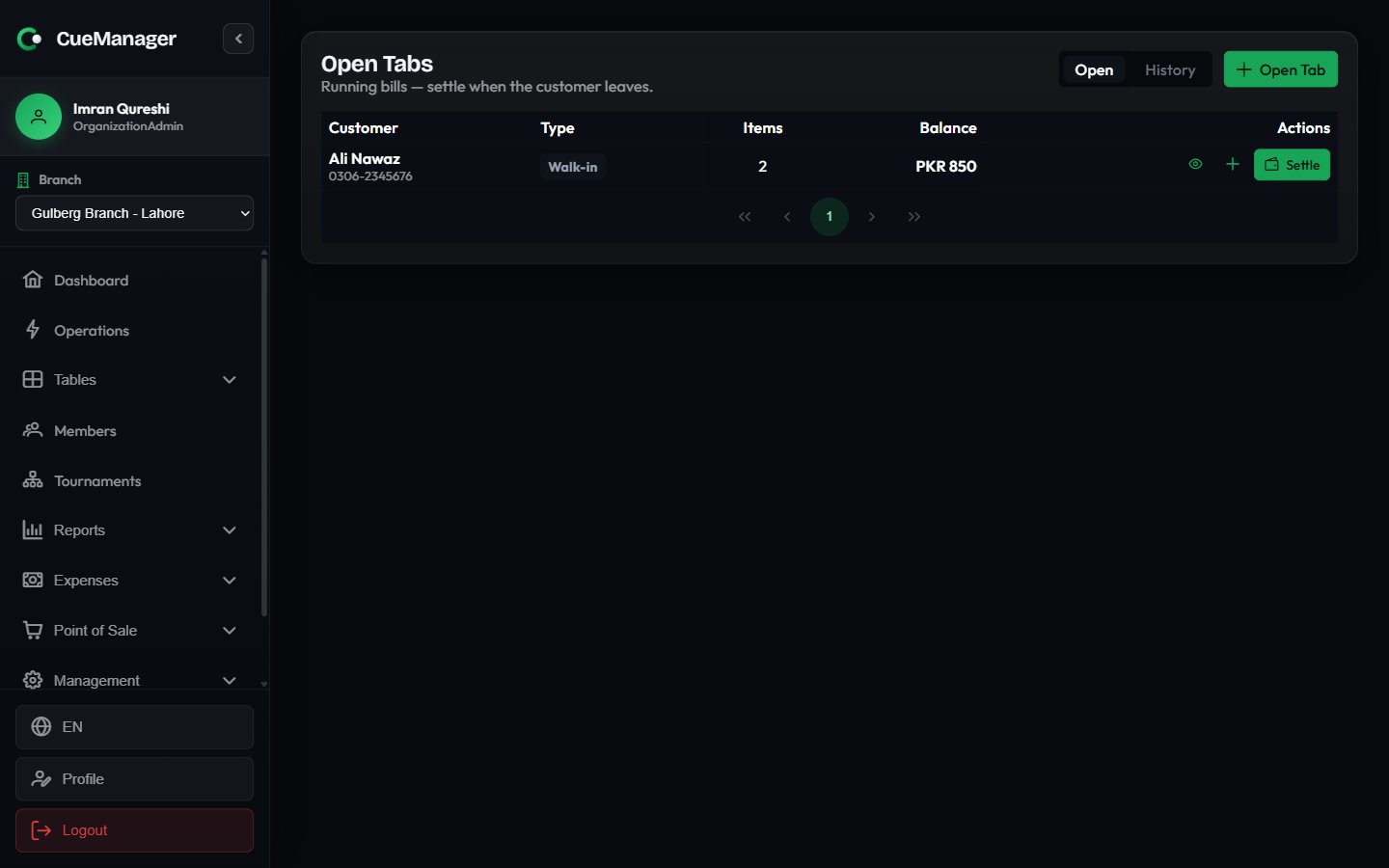
Open tabs with balances and per-row actions
Add charges
Three things put money on a tab.A POS sale
A POS sale
In the terminal’s checkout dialog, press Add to Tab instead of Complete Sale. Leave Existing tab (optional) on Customer’s own tab to let CueManager resolve the right tab, or pick a specific open tab from the list. The sale lands on the tab as a canteen line with its items.
A session bill
A session bill
When you end a session, tick Add to tab (pay later). Charge to then offers three modes: Each player’s own tab, One tab for the whole session, or Per player so each player’s share goes to the tab you choose for them. Frame charges follow the loser-pays rule described in How billing works.
A manual charge
A manual charge
Press the plus button on the tab row to open Add Charge. Enter a Description — table time, cue rental — and an Amount. The dialog previews the New balance before you commit. Use this for anything that does not come through POS or a session.
Settle a tab
Press Settle on the tab row. The dialog lists every charge, then the totals: Charges, Paid, and Balance due.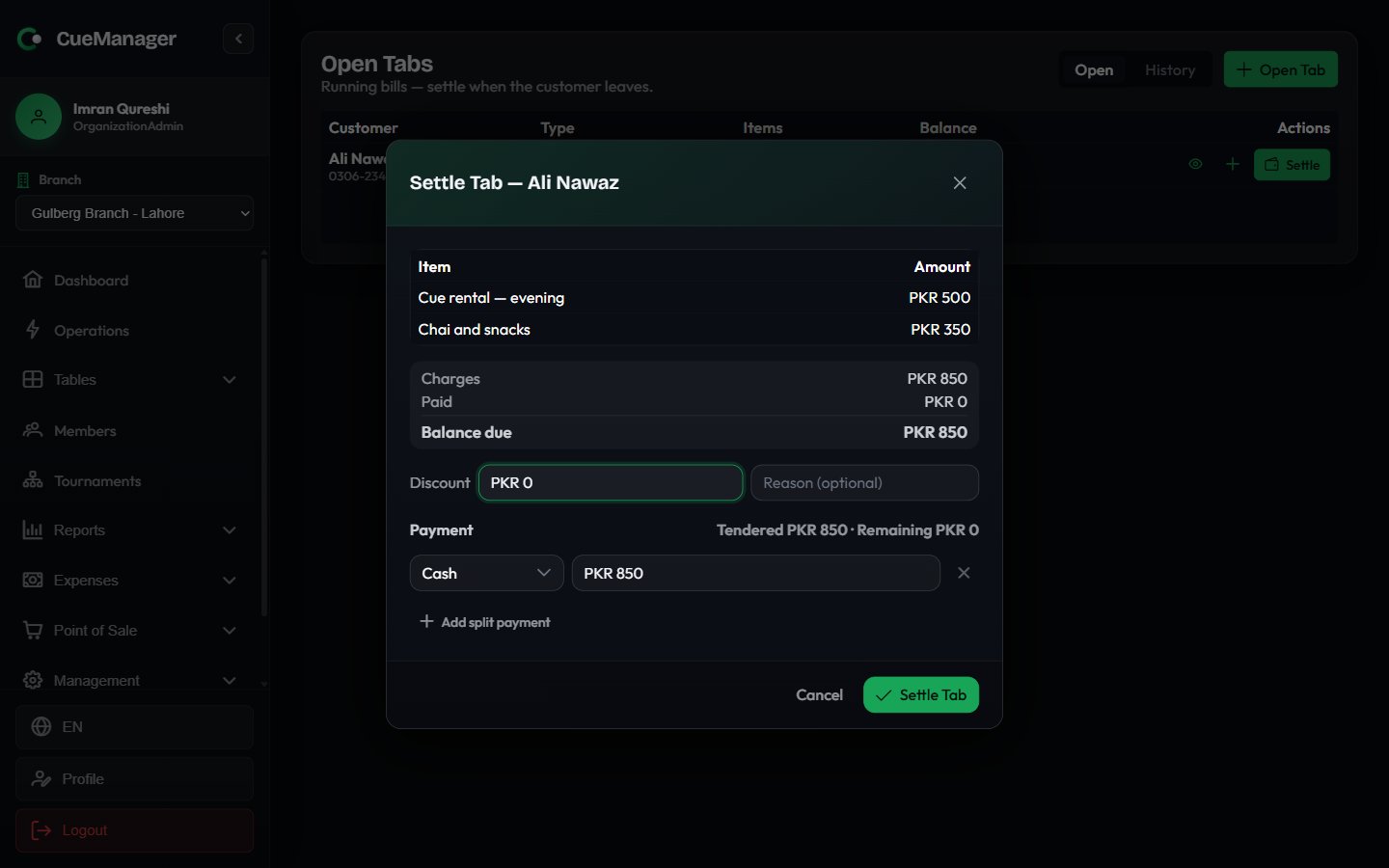
Settling a tab with a discount and split tenders
1
Apply a discount if you are giving one
Enter an amount under Discount and, optionally, a Reason. The discount cannot exceed the balance, and Balance due updates immediately.
2
Enter the tenders
Each payment row is a method plus an amount. The first row is pre-filled with the full balance in Cash. Press Add split payment to add another row when the customer pays part in cash and part by another method — the header keeps a running Tendered and Remaining.
3
Close it out
When the tenders cover the balance, the button reads Settle Tab. Press it, hand over any Change due, and the tab moves to Tab History as Settled.
Partial payments
For a member’s tab you can tick Allow partial payment (leave balance on member account). The button then reads Record Payment: the amount is recorded against the tab, the remaining balance stays open, and the tab keeps running. That is how you take Rs 1,000 off a Rs 2,500 tab tonight and collect the rest next week. Tenders accept Cash, Card, JazzCash, Easypaisa, Raast, and Bank Transfer. Member-owned tabs also offer Member Credit, which draws on the member’s wallet; a badge beside the tender shows whether the balance covers what you are charging.Member credit is unavailable while the device is offline. A wallet balance is server state that another till could have spent, so CueManager will not promise it from a cached copy — take cash or another tender and the dialog says so.
Void a tab
The bin icon appears only on tabs with no charges — an empty tab opened for a customer who left before playing. Voiding it closes the tab without payment and files it under Tab History as Void.Tab history
Switch the toggle from Open to History for settled and voided tabs. Pick a date range, and the table shows the customer, type, status, when the tab was Opened and Closed, the Total, and Closed by — the staff member who took the money. Click any row for the same full breakdown as an open tab.Tabs and offline work
Charges added without a connection are shown separately from the server’s balance rather than folded into it. A tab row carries a note such as incl. Rs 500 not yet synced, and the detail view lists queued charges under Recorded on this device (not yet synced), so staff always know which part of a number the server has confirmed. Two safety locks apply:- Settle is locked while a POS sale for the tab is waiting to sync, because the server prices sales — settling before it lands would take the customer short.
- Both Settle and Add charge are locked while a settlement for the tab is queued, so the same money cannot be taken twice.
Related
Checkout and payments
Split a session bill across players, or push it to a tab.
Member balances
The Member balances report lists unpaid tabs and sessions per member.