

Creating a tournament
1
Open the tournaments list
Go to Tournaments and select New Tournament.
2
Name it and pick a format
Enter a Name (for example, “Crown Summer Cup”), then choose a Format and a Game (Snooker, 8-Ball, or 9-Ball).
3
Set the scope
Owners and SuperAdmins see a Scope field: Single Branch (pick the Branch, for example Gulberg Branch) or All Branches, which lets players from every branch enter one competition. Everyone else creates single-branch tournaments in their own branch.
4
Fill in the schedule and limits
Start date, End date, and Registration deadline are optional dates. Max participants caps the field; Best of (frames) sets the match length.
5
Set the money
Entry fee is what each player pays to enter (for example, Rs 500). Prize pool is the total you plan to pay out. Both default to 0. Add a Description if you want, then select Save.
Formats
Lifecycle
A tournament moves through statuses using the buttons on the tournament detail page. Only the valid next steps are shown.Participants
Open a tournament and use the Participants tab. Select Add Participant, then choose:- Member — pick a registered member (for example, Ahmed Raza). Members already registered do not appear in the list, so you cannot add a duplicate.
- Guest — enter a Guest name, plus optional Phone and Email for a walk-in player.
Use Reinstate to bring a withdrawn player back to Registered, and Remove to delete the entry entirely.
Add Participant is disabled once the tournament is In Progress, Completed, or Cancelled — close registration before you generate the draw.
Entry fees
Rows with an unpaid entry fee show a Collect entry fee action. It opens a small dialog with the Amount (pre-filled from the tournament’s entry fee, editable per player) and a Payment method: Cash, Card, JazzCash, Easypaisa, Raast, Bank Transfer, or Credit (Member Wallet). Paid entries show a green tick next to the amount, so the Entry Fee column doubles as your collection checklist.Bracket and standings
The Bracket & Standings tab holds the draw. Select Generate Bracket to build matches from the current participants; for a group stage, set Groups first.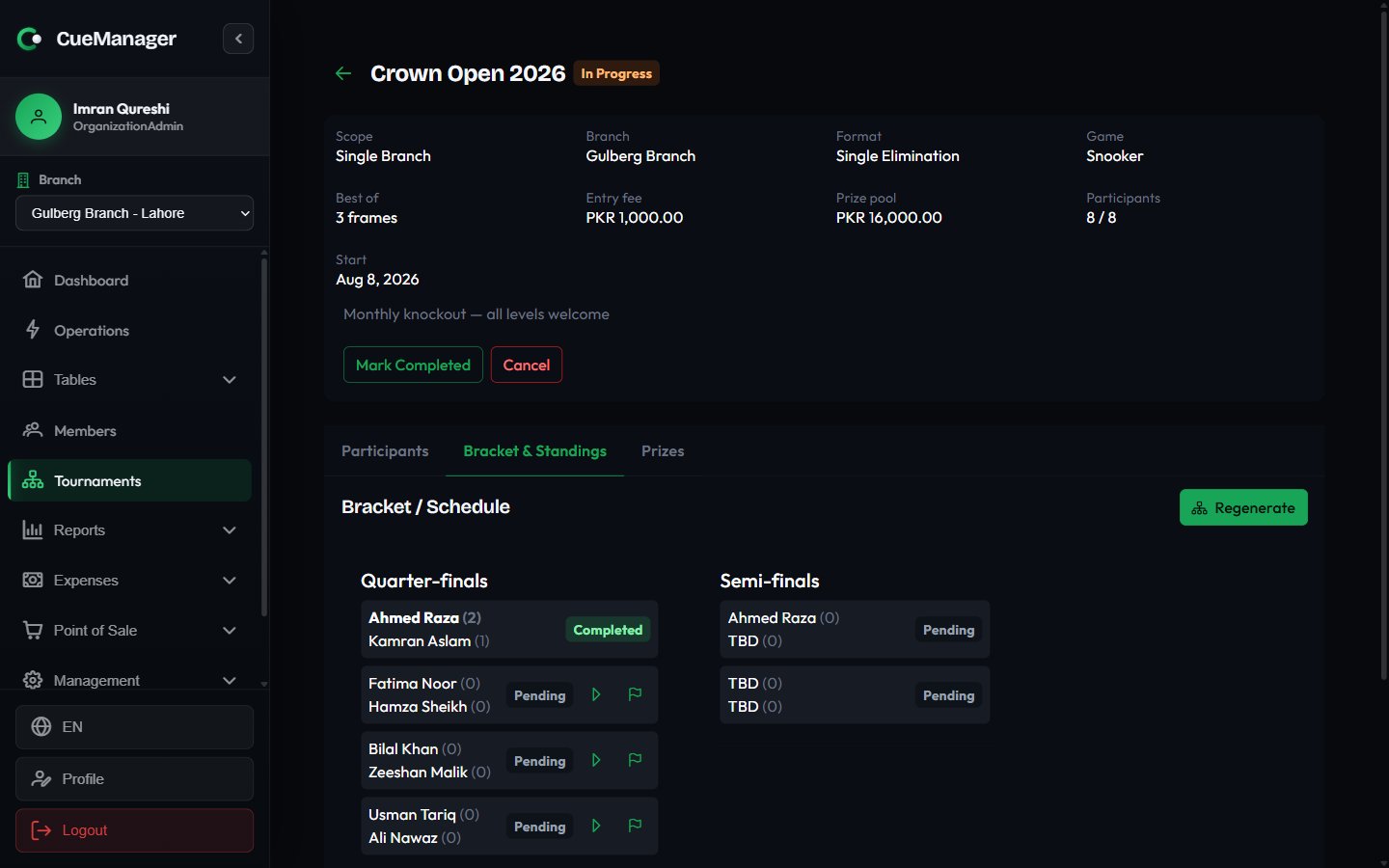
Bracket view with rounds, scores, and match actions
- Record result — enter each player’s frames won and save. If the scores are tied, you must pick the Winner (scores are tied) before saving.
- Start session — puts the match on a real table. Choose the Table (only tables in the tournament’s branch appear, and pool tables are hidden for snooker matches) and a Frame price (0 = free play). The match then plays out like any other session — see Running a session.
- Sync result from session — pulls the frame score back from that session so you do not type it twice.
- Open table — jumps to the live floor.
Below the draw, Standings ranks players by P (played), W, L, frames For and Against, and Pts. Round robin and group-stage tournaments rely on this table for placings.
Prizes and payouts
Use the Prizes tab to define what each finishing position wins.1
Add the prizes
Select Add Prize, then set Position (1, 2, 3…), an optional Label such as “Winner” or “Runner-up”, and the Amount, for example Rs 20,000. Position goes up to 1000 and Amount up to 100,000,000; the fields stop at those values rather than accepting a typo.
2
Assign a winner
Once the results are in, use Edit / assign winner on the prize row and pick the participant from the Winner dropdown. Leave it as Unassigned until you know.
3
Pay it out
Select Pay out, choose the Payment method, and confirm. The row switches from Unpaid to a paid tag showing the method used.
Related pages
Checkout and payments
How payment methods and split payments work elsewhere in the app.
Managing members
Register the players you want to add as members rather than guests.
Reports
Where tournament sessions and takings show up in your numbers.
Roles and permissions
Grant the Tournaments module to the staff who run events.