

Opening the marker
Start the session with the game type set to Snooker (see Starting a session). The active session panel then shows Open marker, which opens the scoring screen for the current frame.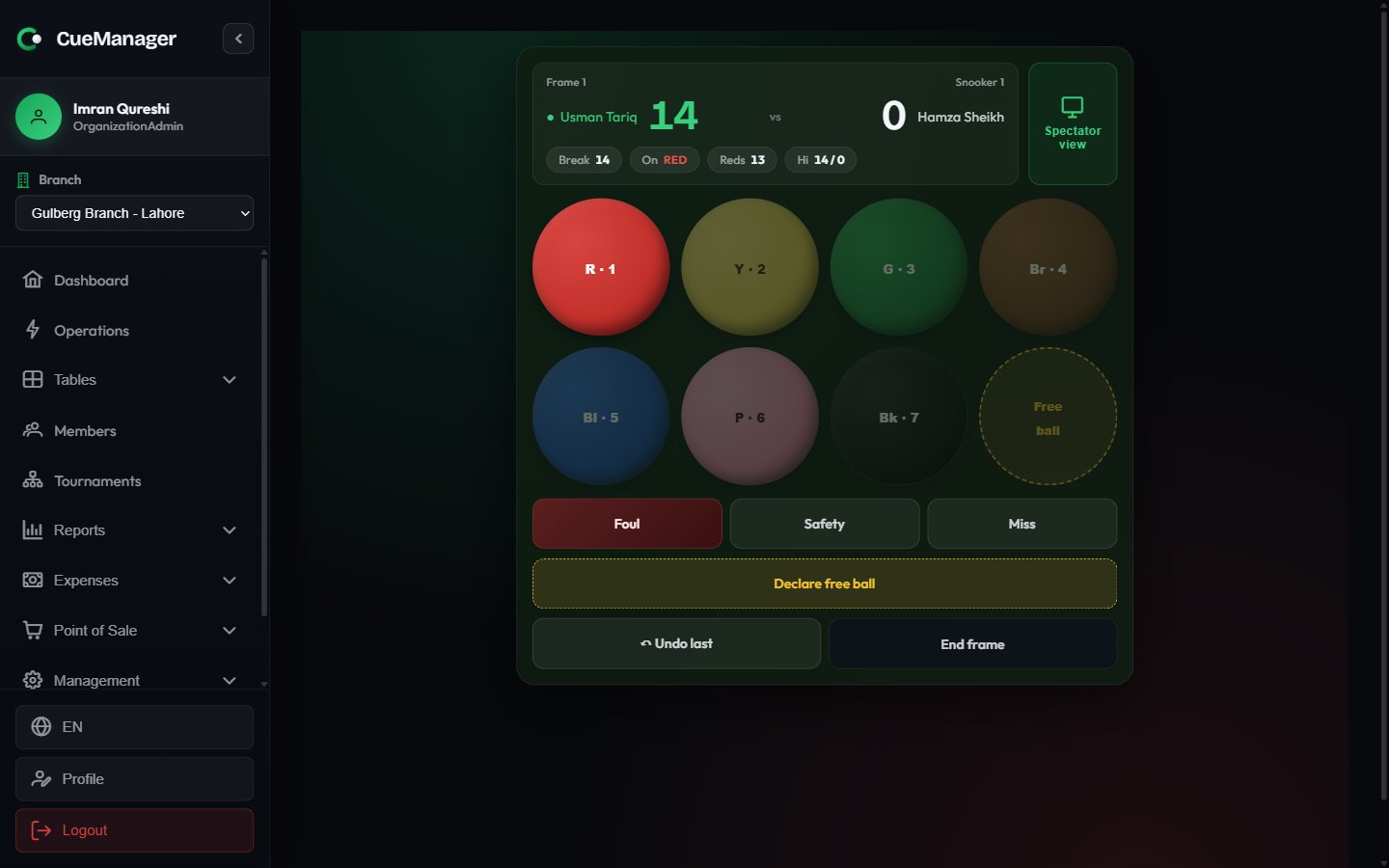
Scoring a frame on the marker
Scoring a frame
1
Record pots on the ball pad
Tap the ball that was potted: red (1), yellow (2), green (3), brown (4), blue (5), pink (6), black (7). Balls that are not legally on are dimmed and cannot be tapped, so the break stays valid.
2
Record a foul
Choose Foul and pick the reason:
The modal shows the Ball involved, the calculated Penalty, and who plays next, ending with Confirm — Bilal Khan plays. The scoring engine on the server has the final say and may raise the penalty if it sees more balls involved.
3
Handle a free ball
After a snooker foul, choose Declare free ball. The Free ball button on the pad becomes tappable so you can score the nominated ball. If the fouled player is offered the shot again, a Play again (replace) button appears.
4
Record safeties and misses
Safety and Miss end the visit without a pot and pass play to the opponent.
5
Place the cue ball when it is in hand
When the cue ball is in hand, the marker locks input and shows an overlay — at frame start, after the cue ball was potted, or after it left the table. It says “Place cue ball anywhere inside the D”, names the ball-on, and unlocks when you choose Ready — record next shot.
6
Correct a mistake
Undo last removes the most recent shot. It is disabled when there is nothing to undo.
7
End the frame
End frame asks to confirm: “This closes the frame and triggers session billing for it.” Accepting closes the frame, charges it to the loser, and shows the Frame ended banner with the winner and final score. Back to tables returns you to the floor.
Ending a frame here is what bills it. The result also raises a Frame Finished alert for the rest of the club to acknowledge — see Running a session.
When the camera says the frame is still open
Forgetting to press End frame before racking the next one is the easy mistake to make: the open frame quietly absorbs the next frame’s pots, and the loser-pays total goes wrong. On a table with a camera, where your branch has opted into the re-rack watchdog (the Camera re-rack watchdog box on the branch form — see Branches) and your deployment has it switched on (see Settings), the camera catches it. It cannot see who won a frame — it can see the reds racked up again, and a rack means the last frame is over. The camera gives the marker a couple of minutes to catch up before saying anything. Movement just after you open a frame does not count — that is you racking up the frame you just started, so open the next frame on your way to the table if that is your habit. The prompt only ever appears while a frame is still open in the marker; a table that merely looks still never raises anything by itself. Where the camera has a rack zone marked on it — a box drawn round the triangle spot in Settings — it gains a sharper trigger: it waits until it has watched the reds sitting racked, scattering out of the triangle, and then coming back into it, all while the same frame is open in the marker. Balls only make that round trip when the frame they were broken for has finished, so it prompts about a minute after seeing it. Movement stays on alongside it as the fallback, for the re-racks the zone could not read — a player standing over the spot, say. Opening the next frame in the marker before the balls are gathered is fine — that frame’s own setup rack is not counted, because nothing had scattered yet. When that happens while the marker still has a frame open, a Frame Still Open prompt appears on every signed-in device:This table looks racked up, but the frame below is still open in the snooker marker.It names the table and frame it means — Snooker 1, Frame 3, Bilal Khan vs Usman Tariq — and offers two buttons.
Ending the frame in the marker clears the nudge everywhere by itself. The moment the engine records the result, the prompt disappears from reception, the manager’s phone, and every other till — the same way a recorded frame alert does. You never have to dismiss a nudge you have acted on.
Nudges only ever appear on snooker tables. A pool table gets the Record Frame Result dialog instead, because it has no marker to end the frame — see Running a session.
The spectator scoreboard
Spectator view in the marker header opens a second, read-only screen sized for a wall display or projector. It shows both scores at full height, the current break, the ball on, reds left, a free-ball indicator, a foul banner as fouls happen, and a cue-ball-in-hand overlay — all driven live from the marker with no input of its own.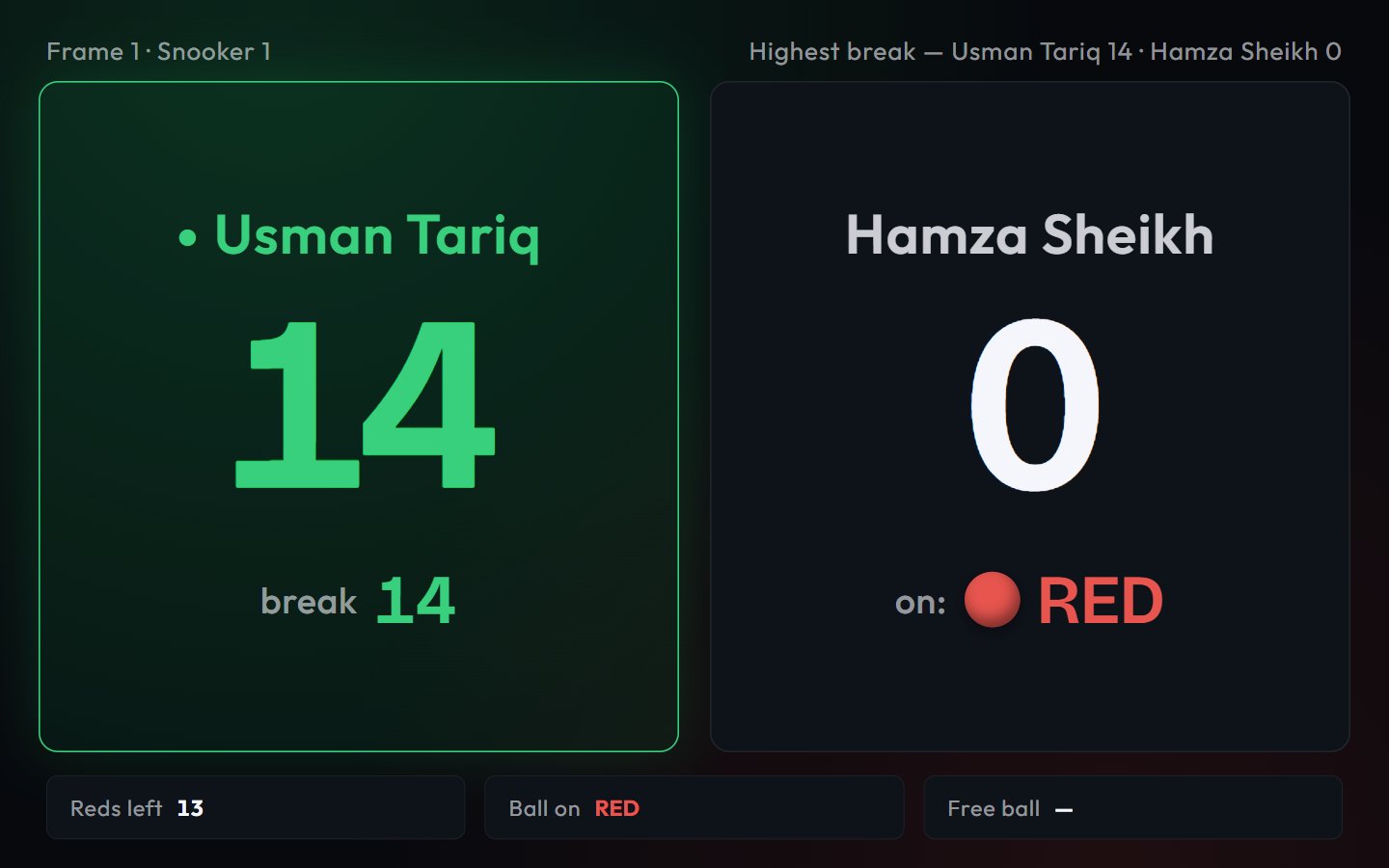
The spectator scoreboard on a wall display
If the screen shows Spectator session not authorized (for example after a display was left on overnight), the link has expired. Reopen the spectator view from the marker to get a fresh one. Even so, open the link only on screens the club controls. Anyone who has it can watch that frame’s score until it expires.
Scoring offline
The marker keeps accepting shots with no connection. Completed frames are held on the device, counted by a pending badge on both the marker and the session panel, and sent when the connection returns. The offline chip in the header tells you when that is happening — see Offline and sync.Related pages
- Starting a session — choosing Snooker as the game type
- Running a session — frame alerts and the session panel
- Settings — pairing a table camera and switching on the re-rack watchdog
- Checkout and payments — how frames become the bill
- Roles and permissions — the Marker role, for scoring-only staff