

Creating a plan
Open Management > Membership Plans from the sidebar. The page needs the Settings / Edit permission.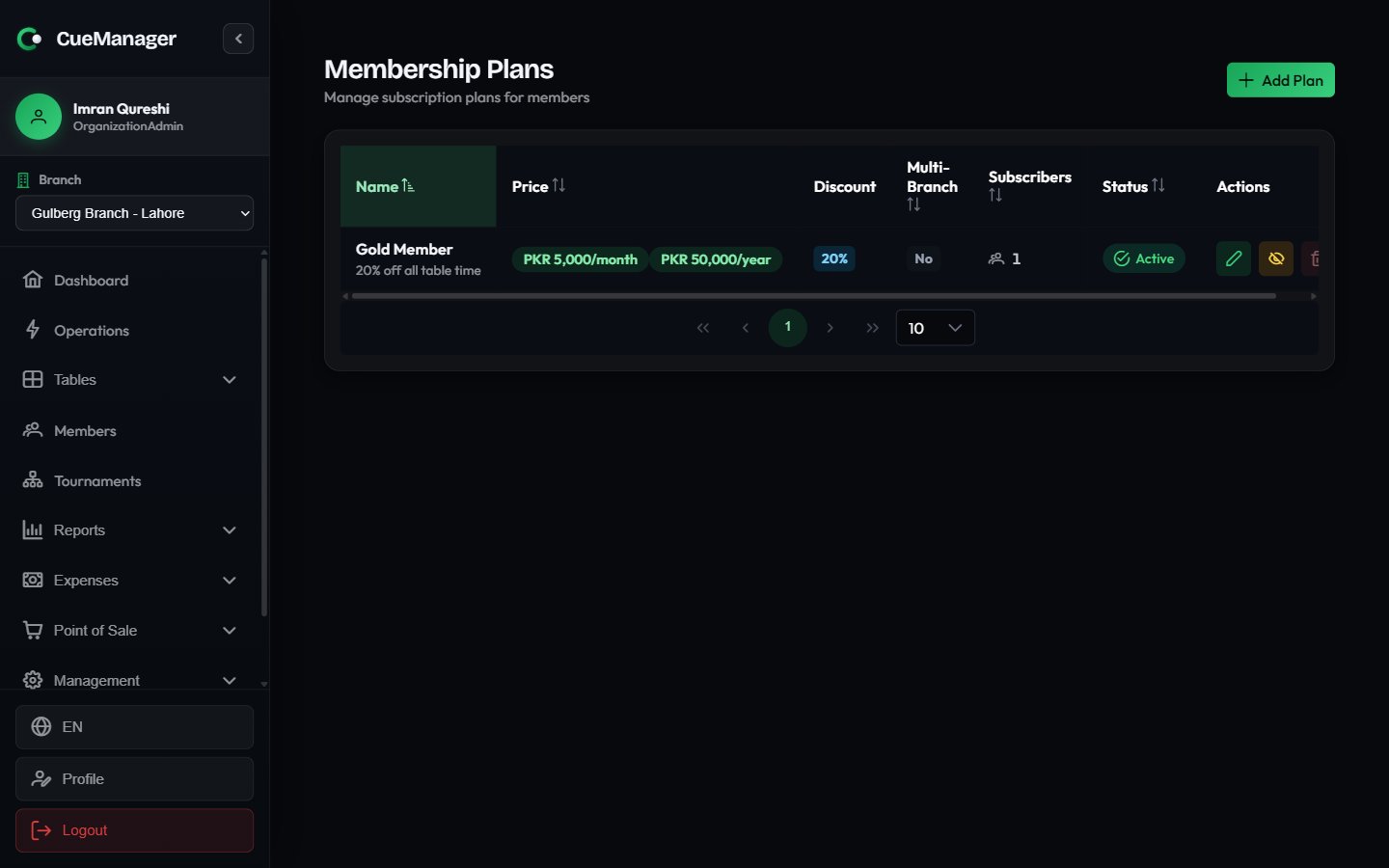
Membership plans with prices, discounts, and subscriber counts
Click Create to save. A “Gold Member — 20% off” plan at Rs 2,000 per month with a 20% session discount is a typical starting point.
The plan list shows Price, Discount (the percentage, or Free play at 100%), Multi-Branch, Subscribers (active subscriber count), and Status. Row actions are Edit Plan, Activate / Deactivate, and Delete Plan.
Assigning a plan to a member
1
Open the member
Go to Members, click View Profile on the member, and open the Subscription tab.
2
Start the subscription
Click Subscribe to Plan. The Subscribe to Membership Plan dialog opens.
3
Choose the plan
Select Plan lists active plans with their prices. If the plan offers both a base interval and an annual price, a Billing Interval picker appears with the exact amount for each choice.
4
Record how it is paid
Payment Method is either Manual (you collected the fee at the counter) or Automatic (Stripe).
5
Confirm
Click Subscribe. The member’s profile now shows an Active Subscription tag, and the Subscription column in the member list flips to Active.
Subscription statuses
Only Active subscriptions that have not passed their period end grant a discount.
How the discount applies at billing
The discount is resolved when a session starts, not when it ends. CueManager looks up each player’s active subscriptions, keeps the best discount per player, and stores it on the session. See How billing works for the underlying pricing models.- Frame pricing — the discount applies per player, to that player’s own share of the frames they lost. In a doubles session each of the four players carries their own percentage, and the checkout shows a small
-20%chip next to any discounted player’s amount. - Hourly and per-minute pricing — the session produces one bill, so the best discount among the players applies to the whole amount. Checkout shows it as a Member Discount (20%) line above the total.
- 100% plans — any player holding a 100% plan makes the whole session free. The session is flagged MEMBER SESSION - FREE PLAY and checkout confirms the session is free for members with active subscriptions.
Because the discount is captured at session start, editing a plan’s percentage or cancelling a subscription mid-session does not change a session already running. The change applies from the next session onwards.
Related pages
Managing members
Register members and read their profiles.
Wallets and credit
Prepaid balances members spend at checkout.
Checkout and payments
Where the discount shows up on the bill.
How billing works
Pricing modes, billing types, and who pays.